Modern Parking Service Template



Edit Template Offline
2. Create new page and search for id 6622391
Edit Template Online
Create Awesome Websites


Free Nicepage Builder
Keywords
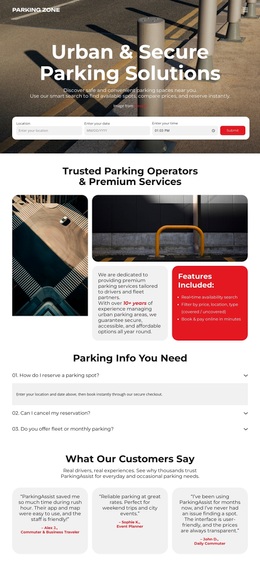
Four Parking Options Framed by Search and Booking
The design is distinguished by how directly it connects parking choice with reservation. Its hero does not begin with a generic service statement alone; it places search fields over a parking photograph and pairs them with a visible Search action. That opening is followed by four concrete service categories—Short-Term, Long-Term, Monthly, and Airport Parking—giving the page broad coverage without losing the central parking task.
The supporting content is equally specific. Feature cards bring together prime city-center locations, competitive pricing, advanced security systems, easy online booking, and flexible cancellation policies. Rather than presenting those points as disconnected claims, the layout places them around parking imagery, then follows with a four-step explanation of searching dates, choosing an option, reserving online, and arriving to park. The visitor can understand both what is available and how the service is used.
A testimonial, FAQ, monthly offer, and several Book Now prompts make this a useful design option for projects that need practical information alongside a clear response path. The dark and light bands, rounded cards, orange icons, and photographic backgrounds reinforce the transportation subject without relying on dense copy. It is a stronger choice for parking services that must explain multiple stay types and reservation steps than for a layout centered only on a single offer or portfolio.
Customize with Nicepage
Open this ready-made template in the Template Builder and customize it visually in the Nicepage editor. Replace demo content, edit page sections, and adapt the design to your project without rebuilding the template from scratch.
Start With a Ready-Made Template
Choose a Design for a New Page
Use a ready-made template as a starting point instead of creating every page from a blank canvas. When adding a new page in Nicepage, browse available designs, compare different layouts, and choose an option that already fits the general purpose and visual direction of your project.
Browse Different Page Designs
Explore Page Designs using search, thematic categories, Design Sets, and full-page previews. The collection includes layouts for different subjects and page purposes, making it easier to compare alternatives before selecting a design to customize.
Customize the Selected Template
After choosing a design, create the page and continue editing it visually in Nicepage. Replace the demo content, adjust images, typography, colors, sections, and other elements, and adapt the ready-made layout to your own content instead of rebuilding the design from the beginning.
Explore More Design Directions
If the first option does not match your project closely enough, return to the design collection and compare other templates before committing to a layout. This makes the template library useful not only for faster page creation, but also for exploring different visual approaches and finding a suitable starting point for a new project.
This workflow gives you access to a broad collection of ready-made designs that can be selected, compared, and customized according to the needs of each new page or project.