Pixel Perfect Every Time Template


Edit Template Offline
2. Create new page and search for id 6542433
Edit Template Online
Create Awesome Websites


Free Nicepage Builder
Keywords
Four Capabilities and Six Featured Projects Give the Portfolio a Clear Point of View
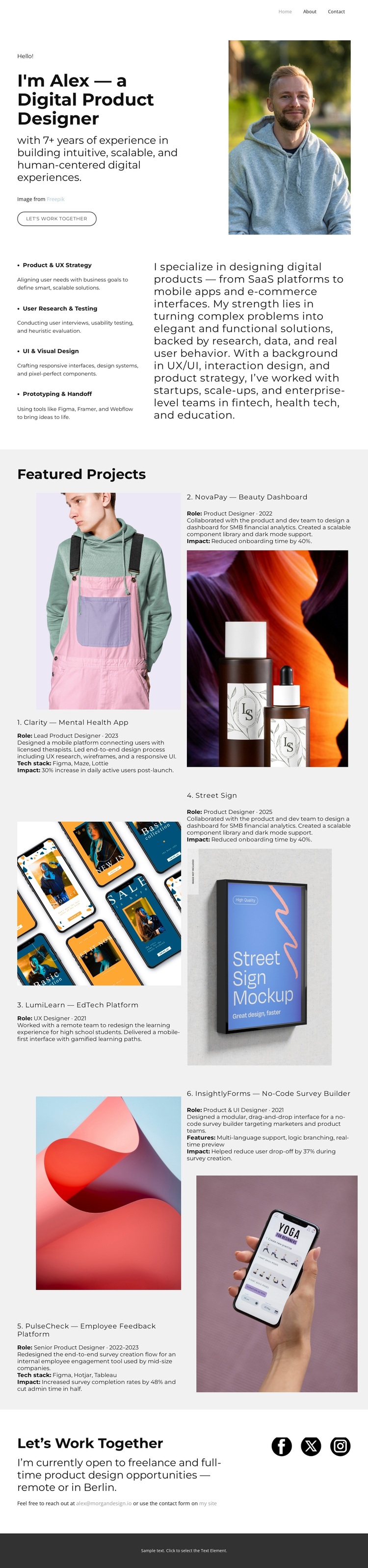
The strongest reason to choose this design is the way it connects personal positioning with visible evidence of work. The opening introduces Alex as a digital product designer through a portrait, experience summary, and work-together button, so the page establishes a human professional context before asking visitors to assess individual projects. That introduction is followed by four specific capability areas: Product and UX Strategy, User Research and Testing, UI and Visual Design, and Prototyping and Handoff. The range gives the portfolio more coverage than a gallery that presents images without explaining the design process.
The six featured project entries make the visual work the central proof of that positioning. Their numbered sequence, varied portrait, product, mobile-interface, and abstract imagery, and supporting role or impact descriptions create an editorial presentation with enough variation to reward browsing. The monochrome palette, bold sans-serif typography, generous white space, muted gray panels, and asymmetrical composition keep the presentation focused on the relationship between project image and explanation.
The closing freelance invitation gives the choice a practical endpoint. Direct email contact and social-profile links follow the project evidence without introducing a competing offer. This design therefore suits a portfolio that needs to communicate individual expertise, show a curated body of work, and make a freelance conversation easy to begin.
Customize with Nicepage
Open this ready-made template in the Template Builder and customize it visually in the Nicepage editor. Replace demo content, edit page sections, and adapt the design to your project without rebuilding the template from scratch.
Start With a Ready-Made Template
Choose a Design for a New Page
Use a ready-made template as a starting point instead of creating every page from a blank canvas. When adding a new page in Nicepage, browse available designs, compare different layouts, and choose an option that already fits the general purpose and visual direction of your project.
Browse Different Page Designs
Explore Page Designs using search, thematic categories, Design Sets, and full-page previews. The collection includes layouts for different subjects and page purposes, making it easier to compare alternatives before selecting a design to customize.
Customize the Selected Template
After choosing a design, create the page and continue editing it visually in Nicepage. Replace the demo content, adjust images, typography, colors, sections, and other elements, and adapt the ready-made layout to your own content instead of rebuilding the design from the beginning.
Explore More Design Directions
If the first option does not match your project closely enough, return to the design collection and compare other templates before committing to a layout. This makes the template library useful not only for faster page creation, but also for exploring different visual approaches and finding a suitable starting point for a new project.
This workflow gives you access to a broad collection of ready-made designs that can be selected, compared, and customized according to the needs of each new page or project.