Start and grow your business Template


Edit Template Offline
2. Create new page and search for id 29172
Edit Template Online
Create Awesome Websites


Free Nicepage Builder
Keywords
A Four-Stage Business Story with Research-Led Content
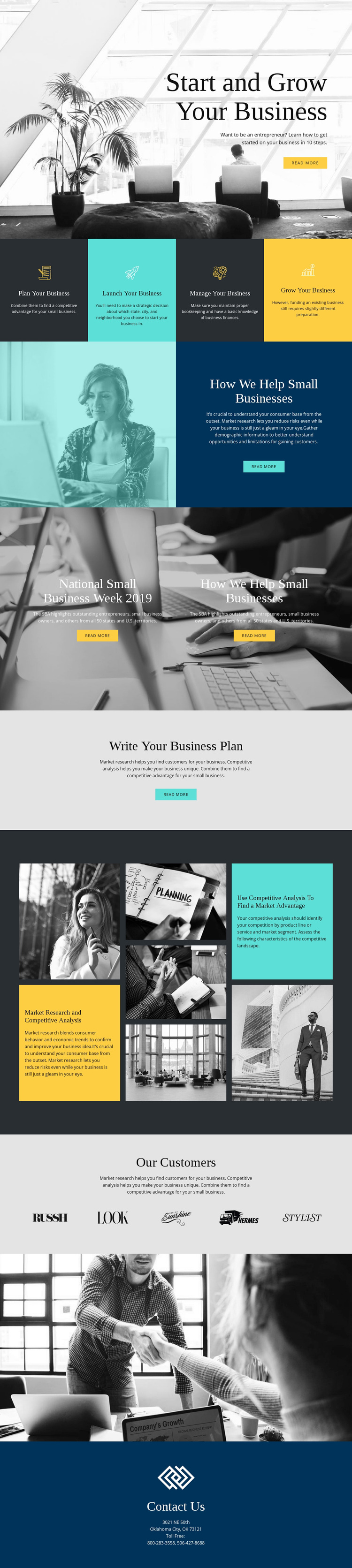
The strongest reason to choose this design is the way it turns small-business guidance into a visible progression. The four equal panels move from planning to launching, managing, and growing, giving the page a distinctive process model instead of a generic list of services. That structure is reinforced by the opening hero, where the “Start and Grow Your Business” heading and monochrome business photograph establish an editorial, educational direction before the process panels begin.
The design also covers several related content needs without losing that central subject. “How We Help Small Businesses” pairs a photograph with explanatory text, the centered business-plan section isolates a practical topic, and the mosaic connects market research with competitive analysis. These relationships make the layout suitable for projects that need to explain a path, provide supporting education, and guide readers toward additional material through repeated read-more actions.
The visual range is another useful distinction. Blue, teal, yellow, gray, and monochrome imagery create changes in emphasis, while large photographic backgrounds and generous spacing keep the page from becoming a dense text article. Five displayed customer or partner logos add a separate supporting area, and the final contact section gives the page a defined close. This is a useful design option for small-business education or support content that needs both an organized process and enough visual variety to sustain a long page.
Customize with Nicepage
Open this ready-made template in the Template Builder and customize it visually in the Nicepage editor. Replace demo content, edit page sections, and adapt the design to your project without rebuilding the template from scratch.
Start With a Ready-Made Template
Choose a Design for a New Page
Use a ready-made template as a starting point instead of creating every page from a blank canvas. When adding a new page in Nicepage, browse available designs, compare different layouts, and choose an option that already fits the general purpose and visual direction of your project.
Browse Different Page Designs
Explore Page Designs using search, thematic categories, Design Sets, and full-page previews. The collection includes layouts for different subjects and page purposes, making it easier to compare alternatives before selecting a design to customize.
Customize the Selected Template
After choosing a design, create the page and continue editing it visually in Nicepage. Replace the demo content, adjust images, typography, colors, sections, and other elements, and adapt the ready-made layout to your own content instead of rebuilding the design from the beginning.
Explore More Design Directions
If the first option does not match your project closely enough, return to the design collection and compare other templates before committing to a layout. This makes the template library useful not only for faster page creation, but also for exploring different visual approaches and finding a suitable starting point for a new project.
This workflow gives you access to a broad collection of ready-made designs that can be selected, compared, and customized according to the needs of each new page or project.