Best beauty secrets Template



Edit Template Offline
2. Create new page and search for id 2348498
Edit Template Online
Create Awesome Websites


Free Nicepage Builder
Keywords
Portrait Storytelling Meets Four Practical Beauty Steps
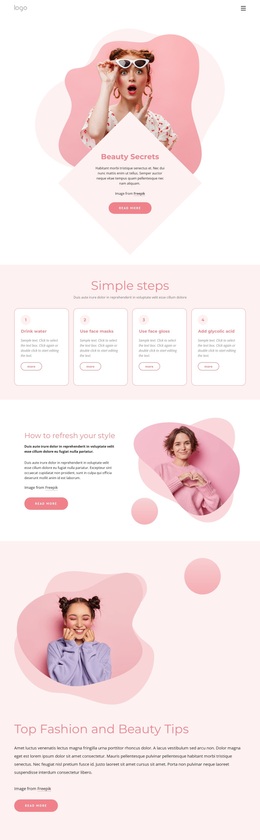
Portrait photography carries the visual character of this design, while the content structure keeps the advice easy to follow. The opening Beauty Secrets hero introduces the subject through a prominent portrait, centered text card, and organic pink shapes. Immediately afterward, four numbered cards turn broad beauty guidance into a more practical sequence, covering visible routine ideas such as drinking water, using face masks, face gloss, and glycolic acid. That combination makes the page more specific than a purely image-led fashion layout.
The design also offers several ways to develop a personal-style topic. The How to refresh your style section pairs explanation with a portrait and Read more action, while the larger Top Fashion and Beauty Tips feature gives the subject more visual weight. The following style-development section adds three smaller highlights, allowing related ideas to sit beside the main editorial feature rather than competing with it. An asymmetrical collage then reinforces the image-led direction and gives the page a less repetitive ending.
A reader can finish by reaching a contact form beside another portrait. Name, email, and message inputs, a Terms of Service acknowledgement, and a Submit action make the design useful for advice projects that want more than passive reading. It is a strong option when beauty content should feel personal, visual, and organized around short, discoverable sections.
Customize with Nicepage
Open this ready-made template in the Template Builder and customize it visually in the Nicepage editor. Replace demo content, edit page sections, and adapt the design to your project without rebuilding the template from scratch.
Start With a Ready-Made Template
Choose a Design for a New Page
Use a ready-made template as a starting point instead of creating every page from a blank canvas. When adding a new page in Nicepage, browse available designs, compare different layouts, and choose an option that already fits the general purpose and visual direction of your project.
Browse Different Page Designs
Explore Page Designs using search, thematic categories, Design Sets, and full-page previews. The collection includes layouts for different subjects and page purposes, making it easier to compare alternatives before selecting a design to customize.
Customize the Selected Template
After choosing a design, create the page and continue editing it visually in Nicepage. Replace the demo content, adjust images, typography, colors, sections, and other elements, and adapt the ready-made layout to your own content instead of rebuilding the design from the beginning.
Explore More Design Directions
If the first option does not match your project closely enough, return to the design collection and compare other templates before committing to a layout. This makes the template library useful not only for faster page creation, but also for exploring different visual approaches and finding a suitable starting point for a new project.
This workflow gives you access to a broad collection of ready-made designs that can be selected, compared, and customized according to the needs of each new page or project.