Service powering business Website Template


Edit Template Offline
2. Create new page and search for id 94148
Edit Template Online
Create Awesome Websites


Free Nicepage Builder
Keywords
A personal hero connects naturally to plans, insights, and inquiries
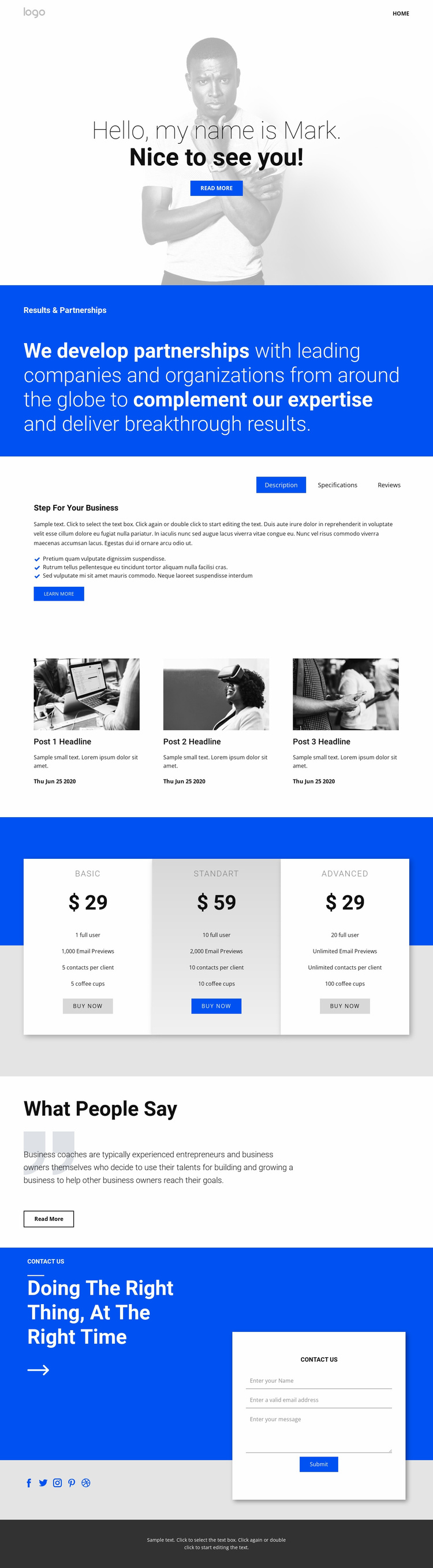
The grayscale portrait and direct greeting establish a personal entry point rather than opening with an anonymous business statement. That choice gives the wider website foundation a recognizable person at its center. The blue Results & Partnerships band then broadens the message from introduction to professional positioning, creating a useful bridge between the coach's identity and the business services or partnership content that could be developed on additional pages.
The middle of the design already suggests several directions for expansion. Description, Specifications, and Reviews are separated into tabs, giving the project a compact information structure for explaining an approach, outlining details, and presenting evaluation-oriented content. Three post previews add an editorial pathway for insights or further reading, while the three pricing cards establish a visible plan area with feature lists and Buy now actions. These are confirmed structural patterns, not proof that the sample prices or claims are real.
The testimonial block adds another trust-oriented content region before the final Contact Us panel. Its placement allows the page to move from personal introduction and information toward reassurance and response. The contact form contains name, email, and message inputs, while five social links and the dark footer supply shared closing elements. As a broader project foundation, the design therefore offers identifiable areas for profile-led messaging, business information, editorial updates, plans, social proof, and inquiries without claiming that multiple finished pages are already included.
Customize with Nicepage
Open this ready-made template in the Website Template Builder and customize it visually in the Nicepage editor. Replace demo content, edit page sections, and adapt the design to your project without rebuilding the template from scratch.
Build a Complete Website From This Template
Customize the Website Visually
Use this ready-made website template as a starting point for your project and adapt its pages visually in Nicepage. Change content, images, typography, navigation, sections, and other design elements while keeping the website together as a single editable project.
Manage Website Pages in One Project
Use the Pages panel to open, add, duplicate, and manage the pages of your website. Work on individual pages while keeping navigation and the overall site structure accessible from the same project, making it easier to develop a complete website instead of managing separate page files.
Expand the Website With Matching Designs
When you need additional pages or sections, use Page Design Sets to find Page and Block Designs created in the same visual style. Design Sets group matching designs together, making it easier to expand the website with new content while maintaining a consistent look across its pages and sections.
Organize Larger Multi-Page Websites
As the website grows, use Page Folders to organize related pages and keep larger multi-page projects easier to navigate in the editor. This is especially useful for websites with separate service pages, company information, contacts, landing pages, and other content areas.
This workflow makes the template a practical foundation for building and expanding a complete website while managing its pages, content, and visual design within one Nicepage project.