Modern Korean Skincare Website Template


Edit Template Offline
2. Create new page and search for id 6672116
Edit Template Online
Create Awesome Websites


Free Nicepage Builder
Keywords
A Storefront Foundation With Products, Education, and Contact Areas
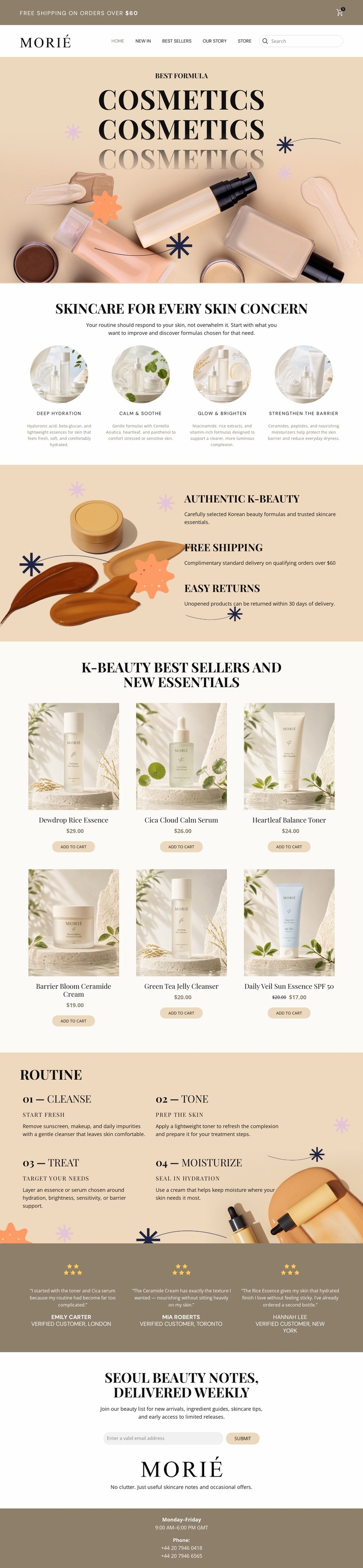
The design already defines several major content areas that a broader skincare website can build around. Morié navigation establishes the storefront identity and provides search and cart context, while the four concern categories create an initial way to organize the subject beyond individual products. Deep Hydration, Calm & Soothe, Glow & Brighten, and Strengthen the Barrier could serve as recurring content themes when related pages or sections are added later.
The six-product catalog supplies the commercial center of the project. Each card includes a product image, name, price, and add-to-cart action, giving the foundation a clear retail relationship rather than only a promotional appearance. The benefits block adds brand and service information, and the routine section contributes educational structure through Cleanse, Tone, Treat, and Moisturize. These areas could support further content about product use, skincare concerns, or the brand’s approach without changing the core visual direction.
Three testimonials offer a reusable reassurance pattern, while the newsletter section creates an ongoing communication area. The footer provides shared contact context through business hours and two phone numbers. Taken together, the design supplies navigation, product content, educational material, proof, subscription, and contact regions. It is therefore a practical starting information architecture for a larger cosmetics project, even though the supplied analysis confirms one storefront page rather than a complete multi-page website.
Customize with Nicepage
Open this ready-made template in the Website Template Builder and customize it visually in the Nicepage editor. Replace demo content, edit page sections, and adapt the design to your project without rebuilding the template from scratch.
Build a Complete Website From This Template
Customize the Website Visually
Use this ready-made website template as a starting point for your project and adapt its pages visually in Nicepage. Change content, images, typography, navigation, sections, and other design elements while keeping the website together as a single editable project.
Manage Website Pages in One Project
Use the Pages panel to open, add, duplicate, and manage the pages of your website. Work on individual pages while keeping navigation and the overall site structure accessible from the same project, making it easier to develop a complete website instead of managing separate page files.
Expand the Website With Matching Designs
When you need additional pages or sections, use Page Design Sets to find Page and Block Designs created in the same visual style. Design Sets group matching designs together, making it easier to expand the website with new content while maintaining a consistent look across its pages and sections.
Organize Larger Multi-Page Websites
As the website grows, use Page Folders to organize related pages and keep larger multi-page projects easier to navigate in the editor. This is especially useful for websites with separate service pages, company information, contacts, landing pages, and other content areas.
This workflow makes the template a practical foundation for building and expanding a complete website while managing its pages, content, and visual design within one Nicepage project.