HM Website Template


Edit Template Offline
2. Create new page and search for id 26813
Edit Template Online
Create Awesome Websites


Free Nicepage Builder
Keywords
Collection and Editorial Areas Establish a Broader Fashion Foundation
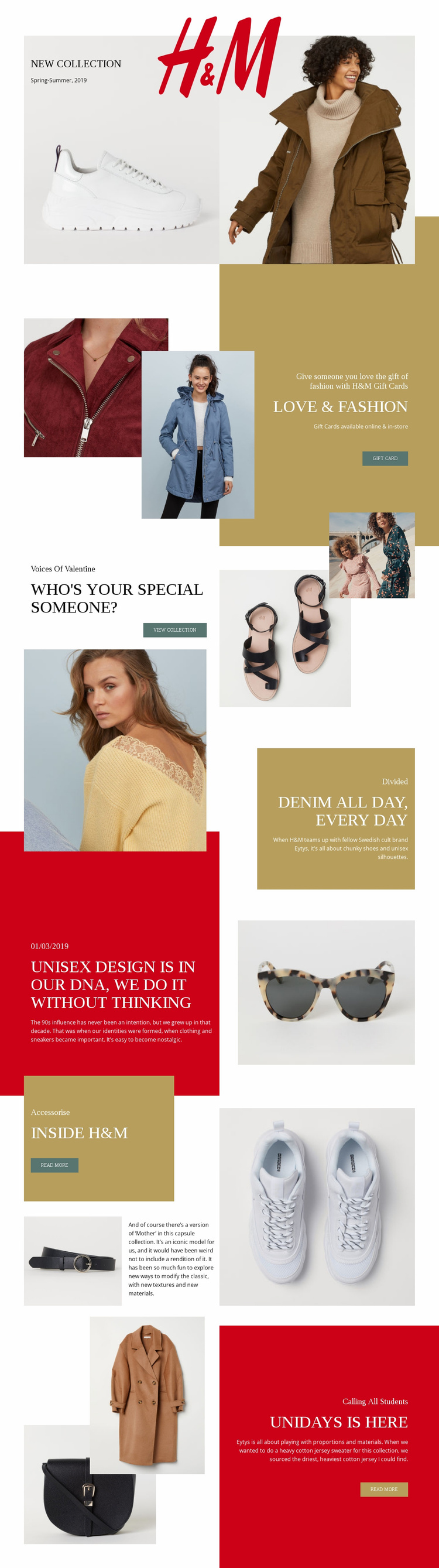
The design already identifies several major content categories that a wider fashion website could build around. The New Collection opening can define the project’s seasonal merchandising direction, while the gift card section supplies a separate commercial content area with online and in-store messaging. Voices Of Valentine adds another collection-focused destination, showing how campaign subjects can sit beside one another without losing their visual relationship.
The Divided denim section and its Eytys collaboration description introduce brand or partnership content rather than another general promotion. The dated unisex design story then provides an editorial model for articles about influence, design, or fashion culture. These areas suggest different kinds of future content—collections, offers, collaborations, and stories—without claiming that additional pages already exist in the template.
Inside H&M adds a reusable editorial pattern built from a feature panel, accessory imagery, descriptive copy, and a Read more action. The UNiDAYS section demonstrates how a broader project could address a defined audience with a dedicated campaign area. Together, these relationships give the page a project foundation rather than only a styled homepage: each major subject has a visible content role that could inform related pages or campaign updates. The consistent use of cream backgrounds, red and mustard accents, asymmetrical photography, and serif headlines can help those future areas remain part of one fashion-oriented site structure.
Customize with Nicepage
Open this ready-made template in the Website Template Builder and customize it visually in the Nicepage editor. Replace demo content, edit page sections, and adapt the design to your project without rebuilding the template from scratch.
Build a Complete Website From This Template
Customize the Website Visually
Use this ready-made website template as a starting point for your project and adapt its pages visually in Nicepage. Change content, images, typography, navigation, sections, and other design elements while keeping the website together as a single editable project.
Manage Website Pages in One Project
Use the Pages panel to open, add, duplicate, and manage the pages of your website. Work on individual pages while keeping navigation and the overall site structure accessible from the same project, making it easier to develop a complete website instead of managing separate page files.
Expand the Website With Matching Designs
When you need additional pages or sections, use Page Design Sets to find Page and Block Designs created in the same visual style. Design Sets group matching designs together, making it easier to expand the website with new content while maintaining a consistent look across its pages and sections.
Organize Larger Multi-Page Websites
As the website grows, use Page Folders to organize related pages and keep larger multi-page projects easier to navigate in the editor. This is especially useful for websites with separate service pages, company information, contacts, landing pages, and other content areas.
This workflow makes the template a practical foundation for building and expanding a complete website while managing its pages, content, and visual design within one Nicepage project.