Design during construction Website Template


Edit Template Offline
2. Create new page and search for id 6001703
Edit Template Online
Create Awesome Websites


Free Nicepage Builder
Keywords
Service Categories and Projects Form a Site Foundation
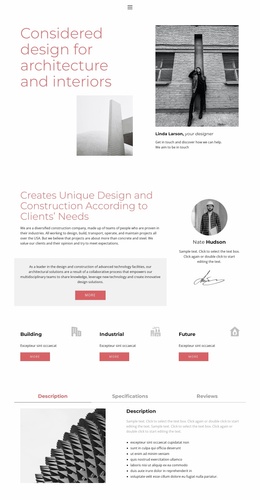
The page already defines several major content areas that can anchor a broader architecture and interior design website. The opening introduction communicates the practice’s subject through a large heading, architectural images, and a designer profile. The following approach section gives that introduction more context by explaining design and construction according to clients’ needs, while the profile area adds a human point of reference.
The three service cards—Building, Industrial, and Future—create a simple basis for organizing future service-focused content. They are followed by tabs for Description, Specifications, and Reviews, which provide a compact model for presenting detailed information alongside imagery. The Projects accordion then establishes a portfolio category with three expandable entries: Sea luxury apartment, Business objects, and Office center. These areas can guide additional project, service, or case-study pages without claiming that such pages already exist in the template.
The team statement and six numbered value propositions add a second layer of positioning. Together with the navigation, mobile navigation, contact channel, Location panel, and dark footer, they show how the current design can support both explanatory and project-led content. As a website foundation, its value lies in the relationships between practice overview, service categories, project evidence, organizational approach, and contact access. Additional pages can follow the same restrained rose, monochrome, and editorial visual direction as the project expands.
Customize with Nicepage
Open this ready-made template in the Website Template Builder and customize it visually in the Nicepage editor. Replace demo content, edit page sections, and adapt the design to your project without rebuilding the template from scratch.
Build a Complete Website From This Template
Customize the Website Visually
Use this ready-made website template as a starting point for your project and adapt its pages visually in Nicepage. Change content, images, typography, navigation, sections, and other design elements while keeping the website together as a single editable project.
Manage Website Pages in One Project
Use the Pages panel to open, add, duplicate, and manage the pages of your website. Work on individual pages while keeping navigation and the overall site structure accessible from the same project, making it easier to develop a complete website instead of managing separate page files.
Expand the Website With Matching Designs
When you need additional pages or sections, use Page Design Sets to find Page and Block Designs created in the same visual style. Design Sets group matching designs together, making it easier to expand the website with new content while maintaining a consistent look across its pages and sections.
Organize Larger Multi-Page Websites
As the website grows, use Page Folders to organize related pages and keep larger multi-page projects easier to navigate in the editor. This is especially useful for websites with separate service pages, company information, contacts, landing pages, and other content areas.
This workflow makes the template a practical foundation for building and expanding a complete website while managing its pages, content, and visual design within one Nicepage project.