Fun Sunglasses Website Template


Edit Template Offline
2. Create new page and search for id 31594
Edit Template Online
Create Awesome Websites


Free Nicepage Builder
Keywords
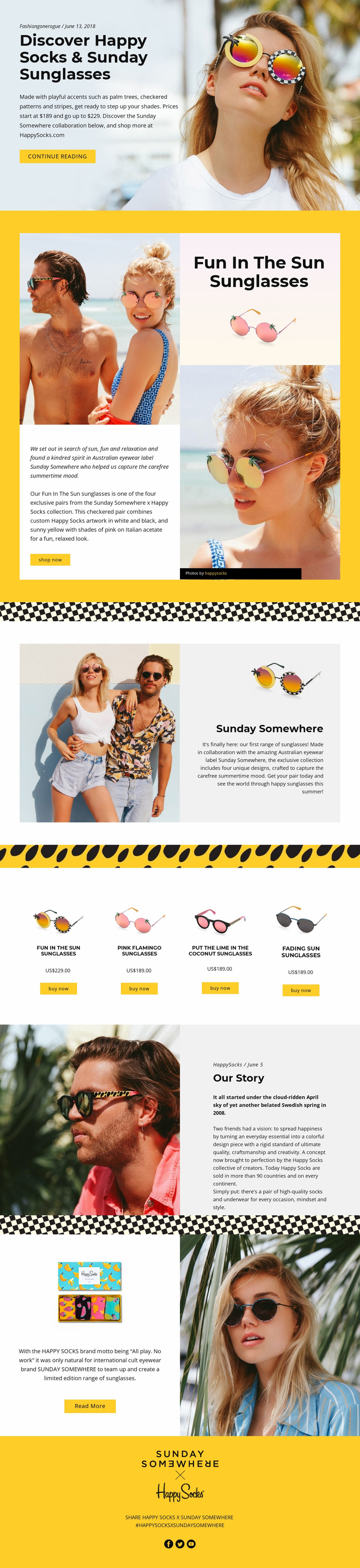
A Collaboration Story with Product and Brand Content Areas
The template already separates several major website content areas around one campaign subject. The opening hero introduces the Happy Socks and Sunday Somewhere partnership, then the featured sunglasses section gives one product story a prominent editorial treatment. The collection introduction adds context before visitors reach the four-card product lineup, where each design is presented with an image, name, price, and purchase link. This progression gives a wider project a useful starting information structure: introduction, featured offering, collection context, and product access.
The later Our Story section contributes a different kind of content area by explaining brand background rather than repeating product information. A separate collaboration feature combines promotional imagery with a Read More action, while the final social section supports campaign sharing through a hashtag and social icons. These areas could inform additional project pages or supporting content while preserving the same visual relationship between photography, concise copy, and strong yellow accents.
The evidence supports describing this design as a foundation, not as an existing multi-page website. Its confirmed structure is one editorial product feature page, but the page already distinguishes the content categories a broader fashion or eyewear project might need. Related pages could expand product information, brand stories, or campaign material while referring back to the same collection logic. Nicepage’s Pages panel is relevant when a project grows beyond this single design, although the template’s main value here comes from the content areas it has already organized.
Customize with Nicepage
Open this ready-made template in the Website Template Builder and customize it visually in the Nicepage editor. Replace demo content, edit page sections, and adapt the design to your project without rebuilding the template from scratch.
Build a Complete Website From This Template
Customize the Website Visually
Use this ready-made website template as a starting point for your project and adapt its pages visually in Nicepage. Change content, images, typography, navigation, sections, and other design elements while keeping the website together as a single editable project.
Manage Website Pages in One Project
Use the Pages panel to open, add, duplicate, and manage the pages of your website. Work on individual pages while keeping navigation and the overall site structure accessible from the same project, making it easier to develop a complete website instead of managing separate page files.
Expand the Website With Matching Designs
When you need additional pages or sections, use Page Design Sets to find Page and Block Designs created in the same visual style. Design Sets group matching designs together, making it easier to expand the website with new content while maintaining a consistent look across its pages and sections.
Organize Larger Multi-Page Websites
As the website grows, use Page Folders to organize related pages and keep larger multi-page projects easier to navigate in the editor. This is especially useful for websites with separate service pages, company information, contacts, landing pages, and other content areas.
This workflow makes the template a practical foundation for building and expanding a complete website while managing its pages, content, and visual design within one Nicepage project.