Wearing trends in sports Website Template


Edit Template Offline
2. Create new page and search for id 30686
Edit Template Online
Create Awesome Websites


Free Nicepage Builder
Keywords
Activity Categories and Product Stories Establish a Broader Site Foundation
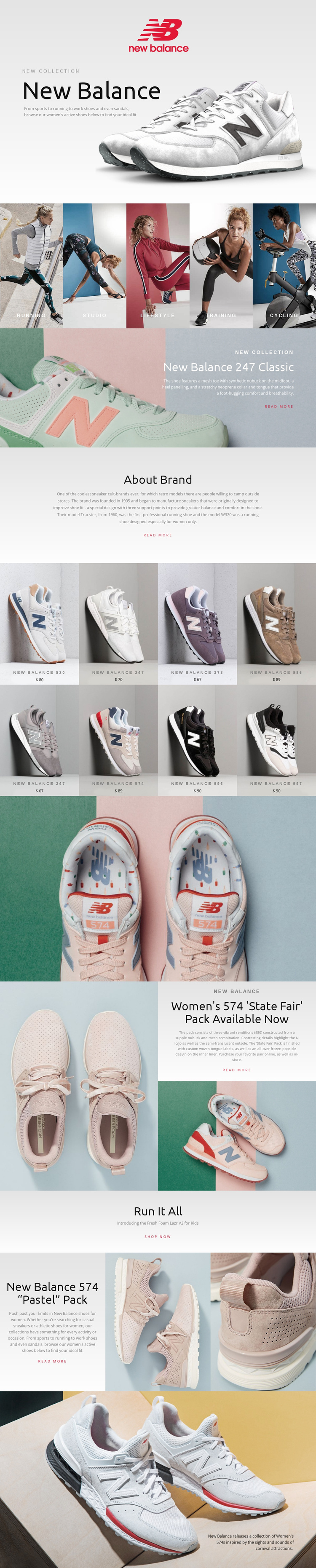
The page already defines several major content areas that could guide a larger athletic-footwear website. The New Balance hero introduces the collection direction, while the five activity categories create clear subject areas for Running, Studio, Lifestyle, Training, and Cycling. These panels can serve as an organizing idea for future product or editorial pages without claiming that those additional pages are already included in this template. The About Brand section adds a separate place for background information, helping the project distinguish brand storytelling from product presentation.
The product-focused regions provide a second layer of structure. An eight-item grid displays named footwear tiles with prices, creating a recognizable assortment area, while the 247 Classic, Women's 574 State Fair Pack, and 574 Pastel Pack receive more detailed promotional treatment. The Fresh Foam Lazr V2 for Kids block introduces a different audience and demonstrates how another collection story could fit within the same design direction. Read more links support deeper content, and Shop now provides a direct commercial route. Because the layout already combines navigation-friendly categories, repeated products, editorial features, brand context, and strong image treatment, it can act as a visual and informational starting point for expanding a footwear website while preserving a consistent fashion-led identity.
Customize with Nicepage
Open this ready-made template in the Website Template Builder and customize it visually in the Nicepage editor. Replace demo content, edit page sections, and adapt the design to your project without rebuilding the template from scratch.
Build a Complete Website From This Template
Customize the Website Visually
Use this ready-made website template as a starting point for your project and adapt its pages visually in Nicepage. Change content, images, typography, navigation, sections, and other design elements while keeping the website together as a single editable project.
Manage Website Pages in One Project
Use the Pages panel to open, add, duplicate, and manage the pages of your website. Work on individual pages while keeping navigation and the overall site structure accessible from the same project, making it easier to develop a complete website instead of managing separate page files.
Expand the Website With Matching Designs
When you need additional pages or sections, use Page Design Sets to find Page and Block Designs created in the same visual style. Design Sets group matching designs together, making it easier to expand the website with new content while maintaining a consistent look across its pages and sections.
Organize Larger Multi-Page Websites
As the website grows, use Page Folders to organize related pages and keep larger multi-page projects easier to navigate in the editor. This is especially useful for websites with separate service pages, company information, contacts, landing pages, and other content areas.
This workflow makes the template a practical foundation for building and expanding a complete website while managing its pages, content, and visual design within one Nicepage project.