Luxury Apartments Website Template


Edit Template Offline
2. Create new page and search for id 24215
Edit Template Online
Create Awesome Websites


Free Nicepage Builder
Keywords
Accommodation, amenities, and Delft guidance establish the site foundation
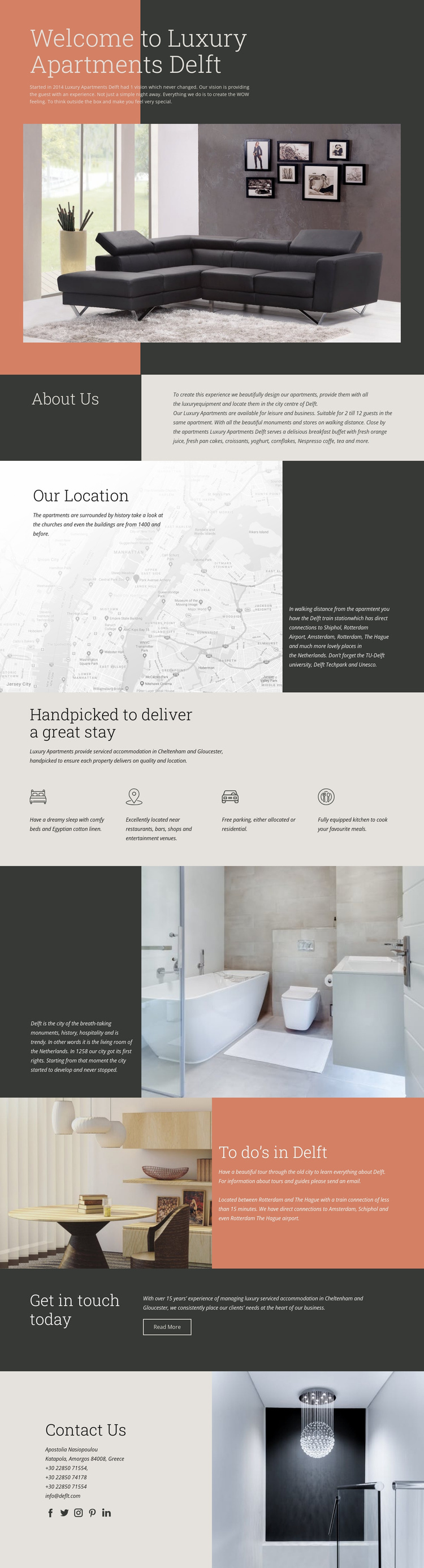
The opening sections define the main content categories a larger hospitality project would need. The welcome area introduces Luxury Apartments Delft through a prominent apartment image, while About Us explains the accommodation and guest experience. Our Location adds a separate destination-focused area with historic surroundings and transport connections, giving the property a context that can support further information about staying in Delft.
The four-item amenity grid provides a repeatable content pattern within that foundation. Comfortable beds and linen, a central location, free parking, and an equipped kitchen are presented as peer features, making the group suitable for a concise accommodation overview. The later history and “To do’s in Delft” sections broaden the structure toward local tours, activities, and regional travel information. These areas could help organize additional destination content without changing the page’s visual direction.
The closing sections complete the project path from discovery to communication. Get in touch today introduces a visible next step, and Contact Us combines direct details with social links. The design does not prove that a complete multi-page website already exists, but its distinct property, amenity, destination, and contact regions provide a clear starting information architecture. Additional pages could therefore grow around the same editorial headings, muted palette, spacious imagery, and understated hospitality identity.
Customize with Nicepage
Open this ready-made template in the Website Template Builder and customize it visually in the Nicepage editor. Replace demo content, edit page sections, and adapt the design to your project without rebuilding the template from scratch.
Build a Complete Website From This Template
Customize the Website Visually
Use this ready-made website template as a starting point for your project and adapt its pages visually in Nicepage. Change content, images, typography, navigation, sections, and other design elements while keeping the website together as a single editable project.
Manage Website Pages in One Project
Use the Pages panel to open, add, duplicate, and manage the pages of your website. Work on individual pages while keeping navigation and the overall site structure accessible from the same project, making it easier to develop a complete website instead of managing separate page files.
Expand the Website With Matching Designs
When you need additional pages or sections, use Page Design Sets to find Page and Block Designs created in the same visual style. Design Sets group matching designs together, making it easier to expand the website with new content while maintaining a consistent look across its pages and sections.
Organize Larger Multi-Page Websites
As the website grows, use Page Folders to organize related pages and keep larger multi-page projects easier to navigate in the editor. This is especially useful for websites with separate service pages, company information, contacts, landing pages, and other content areas.
This workflow makes the template a practical foundation for building and expanding a complete website while managing its pages, content, and visual design within one Nicepage project.