Reebok Website Template


Edit Template Offline
2. Create new page and search for id 18116
Edit Template Online
Create Awesome Websites


Free Nicepage Builder
Keywords
Product Categories and Editorial Features Establish a Site Foundation
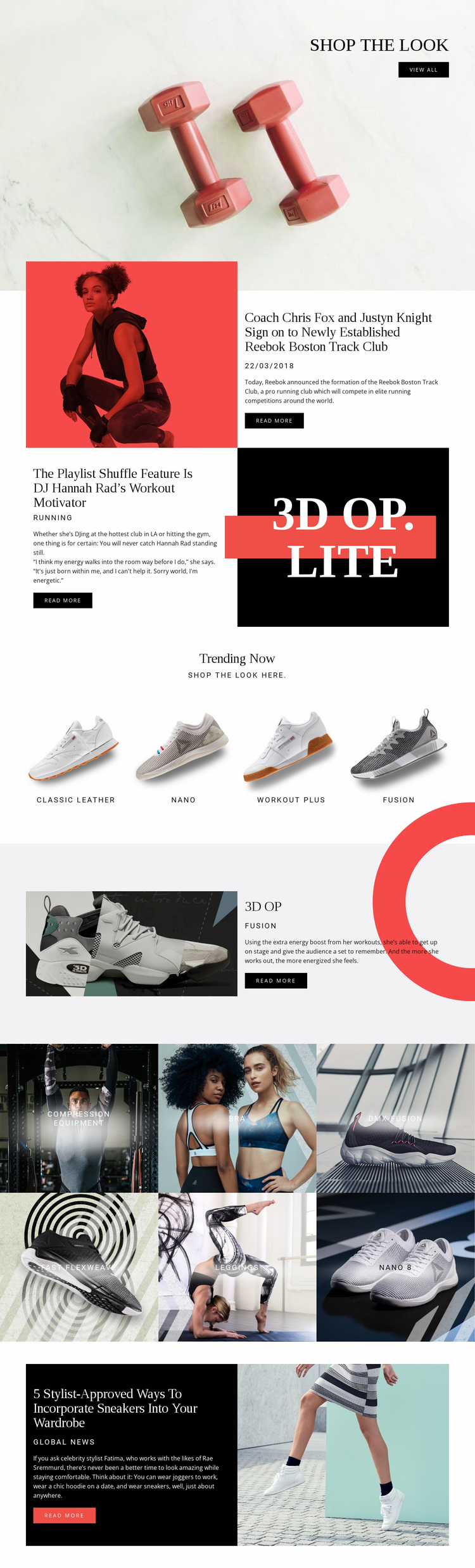
The design already identifies several major content areas that a broader athletic lifestyle website could build upon. The opening shop the look section establishes a merchandising entry point, while the three editorial stories introduce subjects that could support news, culture, or inspiration content around the products. Their different themes—track-club activity, workout music, and sneaker styling—show how the visual system can accommodate more than direct product presentation.
Recurring product areas provide another foundation layer. Trending Now contains four highlighted labels: Classic Leather, nano, workout plus, and fusion. The six-tile gallery adds category-oriented content for compression equipment, bra, dmx fusion, fast flexweave, leggings, and nano 8. The 3D OP section offers a model for a more detailed featured-product area with dedicated imagery, category text, description, and action. These roles could inform additional product, editorial, or category pages without claiming that those pages already exist in the supplied template.
The repeated black, white, and red visual language can connect future content to the current page, while the existing split blocks, grids, and galleries provide recurring layout patterns. As a website foundation, the design contributes an initial information architecture for shopping and editorial expansion rather than merely a styled homepage with no clear content directions.
Customize with Nicepage
Open this ready-made template in the Website Template Builder and customize it visually in the Nicepage editor. Replace demo content, edit page sections, and adapt the design to your project without rebuilding the template from scratch.
Build a Complete Website From This Template
Customize the Website Visually
Use this ready-made website template as a starting point for your project and adapt its pages visually in Nicepage. Change content, images, typography, navigation, sections, and other design elements while keeping the website together as a single editable project.
Manage Website Pages in One Project
Use the Pages panel to open, add, duplicate, and manage the pages of your website. Work on individual pages while keeping navigation and the overall site structure accessible from the same project, making it easier to develop a complete website instead of managing separate page files.
Expand the Website With Matching Designs
When you need additional pages or sections, use Page Design Sets to find Page and Block Designs created in the same visual style. Design Sets group matching designs together, making it easier to expand the website with new content while maintaining a consistent look across its pages and sections.
Organize Larger Multi-Page Websites
As the website grows, use Page Folders to organize related pages and keep larger multi-page projects easier to navigate in the editor. This is especially useful for websites with separate service pages, company information, contacts, landing pages, and other content areas.
This workflow makes the template a practical foundation for building and expanding a complete website while managing its pages, content, and visual design within one Nicepage project.