Sunglasses Website Template


Edit Template Offline
2. Create new page and search for id 13030
Edit Template Online
Create Awesome Websites


Free Nicepage Builder
Keywords
Product, Brand, and Social Areas Establish a Website Foundation
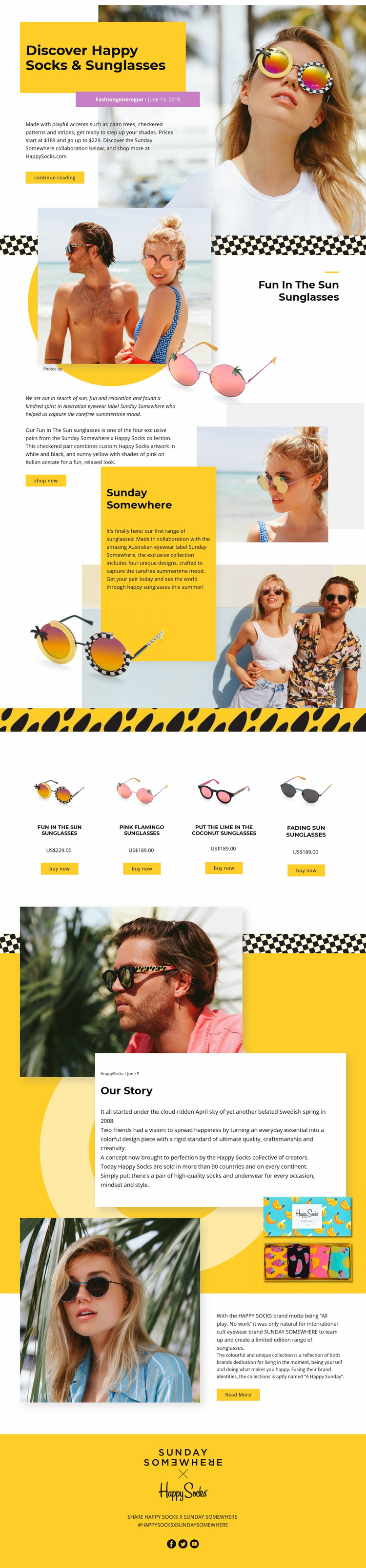
The design already defines several major content areas that can serve as the basis for a broader fashion website. Its opening hero introduces the Happy Socks and Sunday Somewhere collaboration, while the featured “Fun in The Sun Sunglasses” section gives the project a focused product-story area with imagery, description, and a shop now action. Full-width lifestyle photographs create strong visual regions that could remain consistent as related content is added around the collection.
The four-item product section supplies a clear commercial category within that foundation. Fun In The Sun, Pink Flamingo, Put The Lime In The Coconut, and Fading Sun Sunglasses appear as peer products with images, prices, and buy now buttons. This repeated structure can anchor a collection-oriented project without claiming that additional product pages already exist. The collaboration and Our Story sections add a separate brand-content category, giving the project space for background information rather than relying only on product presentation.
Continue reading, read more, and social sharing actions extend the structure beyond the initial product row. The final block links the visual identity to Facebook, Twitter, and YouTube, creating a recognizable closing region for audience interaction. Because the verified design centers on one substantial page, it is most accurate to view these sections as a foundation for broader website expansion, not as proof of an existing multi-page site. The value lies in the defined relationships among product, editorial, brand, and social content.
Customize with Nicepage
Open this ready-made template in the Website Template Builder and customize it visually in the Nicepage editor. Replace demo content, edit page sections, and adapt the design to your project without rebuilding the template from scratch.
Build a Complete Website From This Template
Customize the Website Visually
Use this ready-made website template as a starting point for your project and adapt its pages visually in Nicepage. Change content, images, typography, navigation, sections, and other design elements while keeping the website together as a single editable project.
Manage Website Pages in One Project
Use the Pages panel to open, add, duplicate, and manage the pages of your website. Work on individual pages while keeping navigation and the overall site structure accessible from the same project, making it easier to develop a complete website instead of managing separate page files.
Expand the Website With Matching Designs
When you need additional pages or sections, use Page Design Sets to find Page and Block Designs created in the same visual style. Design Sets group matching designs together, making it easier to expand the website with new content while maintaining a consistent look across its pages and sections.
Organize Larger Multi-Page Websites
As the website grows, use Page Folders to organize related pages and keep larger multi-page projects easier to navigate in the editor. This is especially useful for websites with separate service pages, company information, contacts, landing pages, and other content areas.
This workflow makes the template a practical foundation for building and expanding a complete website while managing its pages, content, and visual design within one Nicepage project.