Audi luxury cars Web Page Design


Edit Template Offline
2. Create new page and search for id 17195
Edit Template Online
Create Awesome Websites


Free Nicepage Builder
Keywords
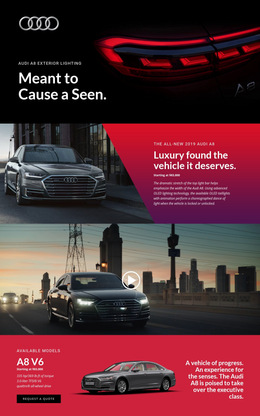
Split panels and full-width imagery control the page’s visual rhythm
The opening composition places a large rear view of the Audi A8 behind a compact brand-and-headline overlay, creating a high-impact first frame. The next split section changes the visual density by pairing a vehicle image with a vivid angled color panel containing the model title, displayed starting price, and lighting description. This image-to-text relationship makes the product introduction easier to scan than a single uninterrupted banner. A full-width vehicle video then expands the page horizontally and provides a clear transition into the more information-heavy model section.
The A8 V6 block balances model imagery with specifications, positioning text, and a Request a Quote action, while the following exterior-lighting section changes the rhythm again through one larger feature area and three compact image-led items. The interior design split repeats the image-and-color-panel relationship in a new subject area, then a wide side-profile image creates another visual pause. Finally, three equal interior panels align rear reading lights, relaxation seating, and Bang & Olufsen 3D Sound as a balanced closing group. These transitions show how one page can move between emphasis, explanation, proof, and response without relying on a uniform grid throughout.
Customize with Nicepage
Open this ready-made template in the Web Page Design Builder and customize it visually in the Nicepage editor. Replace demo content, edit page sections, and adapt the design to your project without rebuilding the template from scratch.
Design a Web Page Section by Section
Choose a Design for Each Section
Build the page from individual content sections instead of starting with a fixed full-page layout. Use Block Designs to browse ready-made sections for different purposes, including introductions, services, galleries, testimonials, contact forms, pricing, and other common parts of a web page. Search or filter the available designs to find a layout that fits the content you want to add.
Combine Blocks and Page Elements
Add selected Blocks to the page and arrange them in the order that supports the page's purpose. A hero section can introduce the main message, followed by services, benefits, portfolio content, testimonials, calls to action, or contact information.
Inside each section, use Web Page Elements such as Text, Image, Hyperlink, Grid, Gallery, and other elements to build and present the page content. Individual elements can be added and adjusted within the Blocks, giving you more control over the composition of each section without having to create the complete layout from scratch.
Refine the Page Layout and Flow
After assembling the main sections, adjust their content, spacing, backgrounds, images, typography, and element placement in the Nicepage editor. Reorder Blocks when necessary and refine the transition from one section to the next so the information hierarchy and visual flow remain clear throughout the page.
This workflow makes the template useful as a web page design that can be composed from ready-made sections, customized with individual page elements, rearranged, and adapted to the content and purpose of an individual page.