Global modern architecture One Page Template


Edit Template Offline
2. Create new page and search for id 34994
Edit Template Online
Create Awesome Websites


Free Nicepage Builder
Keywords
The Page Moves From Place and Story to Booking Information
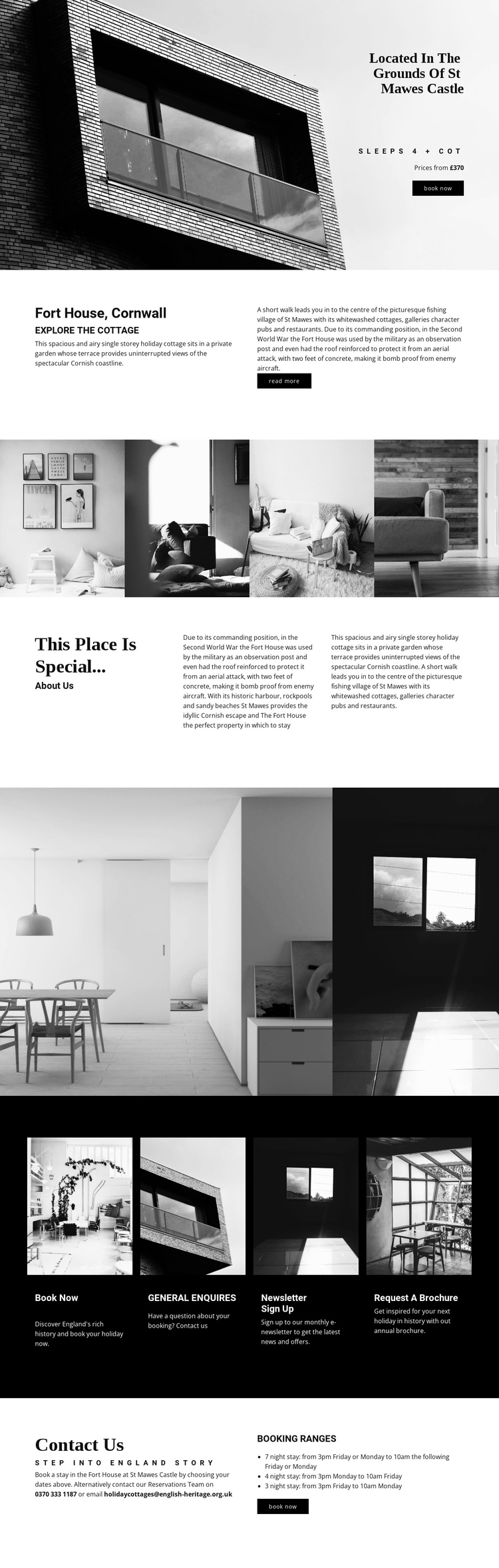
The design creates a continuous content journey without needing the visitor to leave the page to understand the property. The opening hero introduces Fort House through the St Mawes Castle setting, a large image, occupancy for four people plus a cot, a price reference, and a Book now action. The next split section expands the introduction by placing the cottage overview beside historical background, so the visitor receives both practical context and a reason to remember the place.
The sequence then alternates between visual destinations and explanatory content. A four-image strip gives the property a broad visual presence. The following three-column story explains why the building and its coastal setting are special. A second gallery narrows the focus to interiors and architectural details. The dark row of four cards works as another navigational cluster within the same document, separating booking, general enquiries, newsletter sign-up, and brochure requests rather than blending them into the surrounding story.
The closing Contact Us area provides a natural final destination with reservations details and booking guidance for seven-night, four-night, and three-night stays. That order supports exploration of several meaningful sections on one continuous page; it is not based only on the existence of a booking action. Nicepage’s Menu For One-Page Site can connect menu items to page sections when a project needs explicit section navigation, but no anchor navigation is claimed as an existing template fact.
Customize with Nicepage
Open this ready-made template in the One Page Template Builder and customize it visually in the Nicepage editor. Replace demo content, edit page sections, and adapt the design to your project without rebuilding the template from scratch.
Build a Navigable One-Page Website
Connect the Menu to Page Sections
Organize the website as a sequence of sections on a single page and use the Menu For One-Page Site to connect menu items with individual page Blocks. Visitors can jump directly to sections such as About, Services, Testimonials, or Contact without opening separate pages.
Keep the Website on One URL
A one-page template can combine several parts of a small website within one continuous page. Arrange the Header, introduction, services, portfolio, company information, reviews, contact details, and other relevant sections in the order that fits the project while keeping them accessible through the same page navigation.
Make Long Pages Easier to Navigate
For longer one-page websites, keep navigation labels short and connected to meaningful sections so visitors can move through the page without relying only on scrolling. You can also use the Back To Top element to provide a quick way back to the beginning after longer sections.
This workflow makes the template suitable for compact websites that need several distinct content sections while keeping the complete visitor experience on one URL.