You know it's time Joomla Template



Course details stay grouped in three comparable CMS content areas
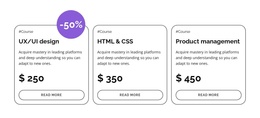
The category labels, course titles, descriptions, prices, and read-more links create three clearly bounded information units. In a Joomla-managed page, that structure can serve as a stable pricing or enrollment-details region: each course keeps its own descriptive context, while the repeated layout makes comparison straightforward. UX/UI design, HTML & CSS, and Product management are presented as parallel choices rather than as one undifferentiated article, which helps the section retain a clear content purpose when placed alongside other managed page content.
The block's visual relationships also support this organization. Three white cards share dark gray outlines, soft corner rounding, bold black typography, and centered pill-shaped links. Their single horizontal row establishes a consistent order for the offerings, while the purple circular -50% badge provides a separate promotional cue above the first card. The badge is best understood as part of the section's presentation, not as proof of a current discount or enrollment policy. Within a broader Joomla project, this reusable region can hold structured course information while other content areas handle introductions, expanded course descriptions, instructors, or contact details.
Customize with Nicepage
Open this ready-made template in the Joomla Page Builder and customize it visually in the Nicepage editor. Replace demo content, edit page sections, and adapt the design to your project without rebuilding the template from scratch.
Edit Template Offline
2. Create a new page or select existing
3. Click Add new block, search for id 6070393 and click enter
Edit Template Online
Create Awesome Websites


Free Nicepage Builder
Keywords
Work With This Template in Joomla
Customize and Install the Joomla Template
Start with this ready-made template instead of building the Joomla design from scratch. Customize its layout, content, typography, images, sections, and other design elements visually in the Nicepage application, then export and install the Joomla Template, Nicepage Extension, and supported content on your Joomla website.
Edit the Template Directly in Joomla
After installation, you can edit the Joomla Template directly in Joomla with the Nicepage Joomla Extension. Customize the Header, Footer, Colors, Fonts, typography, and Page Templates from the Joomla workflow while keeping the site design connected with your CMS content.
Edit Joomla Articles Visually
Use the Nicepage Joomla Extension to open and edit Joomla Articles visually from the Joomla Administrator. Change text, images, sections, layouts, and other page content in the Nicepage editor while continuing to manage the Articles through Joomla.
Joomla Content and Template Integration
Use the customized template together with Joomla Articles, module Positions, menus, forms, Blog Pages, and other supported CMS elements. With the Nicepage Extension used as the Site Style Source, shared design settings can be applied across Joomla Articles while Joomla continues to provide the CMS environment for managing site content.
This workflow combines a ready-made Joomla Template with visual customization, direct template editing in Joomla, and continued content management through the Nicepage Joomla Extension.