The leading design agency Joomla Template


Year-Based Award Records Create a Structured Joomla Content Area
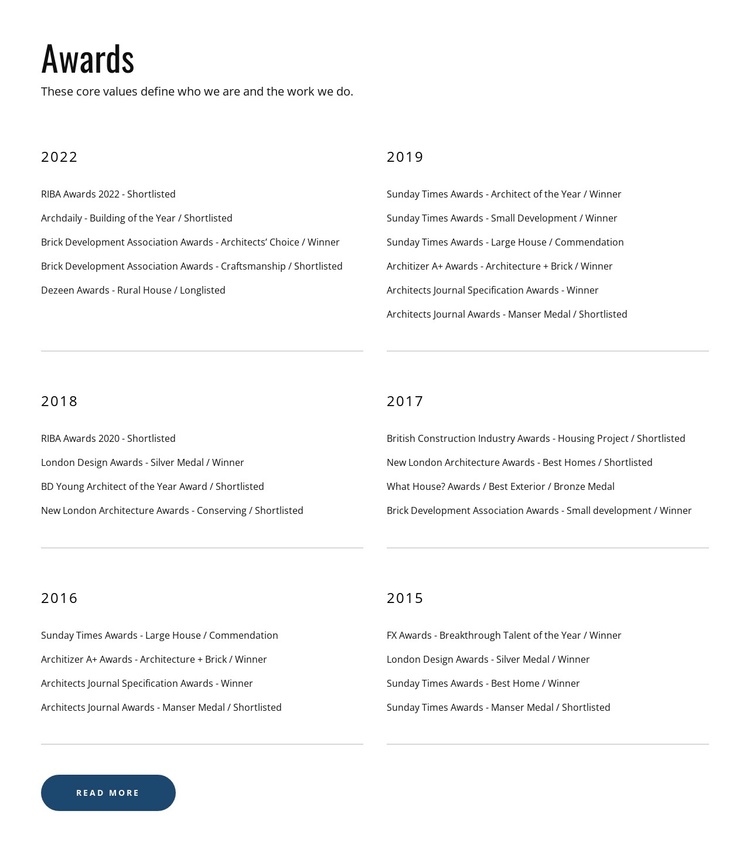
The section begins with the “Awards” heading and the statement, “These core values define who we are and the work we do.” Together, they provide an introductory content group before the repeated recognition records. The main area then divides six annual entries across two columns: 2022, 2019, 2018, 2017, 2016, and 2015. Each entry pairs a year with its award names and result labels, while thin horizontal separators preserve clear boundaries between the compact groups.
The content has a useful structured pattern for a Joomla-managed page. The 2022 entry contains five listed award results, the 2019 entry contains six, and the 2018, 2017, 2016, and 2015 entries each contain four. This variation can accommodate different amounts of recognition while keeping the same year-led presentation. The arrangement is static, so the section communicates its information directly rather than relying on tabs, sliders, or expanding panels.
A rounded Read more button below the grid gives the section a forward-looking content path for fuller award information. In a Joomla-oriented project, the block can occupy a stable recognition region while the wider site manages related editorial content and page structure around it. Its white background, black text, blue accent, and generous spacing keep the structured records readable without turning this single section into a complete Joomla template.
Customize with Nicepage
Open this ready-made template in the Joomla Page Builder and customize it visually in the Nicepage editor. Replace demo content, edit page sections, and adapt the design to your project without rebuilding the template from scratch.
Edit Template Offline
2. Create a new page or select existing
3. Click Add new block, search for id 4455051 and click enter
Edit Template Online
Create Awesome Websites


Free Nicepage Builder
Keywords
Work With This Template in Joomla
Customize and Install the Joomla Template
Start with this ready-made template instead of building the Joomla design from scratch. Customize its layout, content, typography, images, sections, and other design elements visually in the Nicepage application, then export and install the Joomla Template, Nicepage Extension, and supported content on your Joomla website.
Edit the Template Directly in Joomla
After installation, you can edit the Joomla Template directly in Joomla with the Nicepage Joomla Extension. Customize the Header, Footer, Colors, Fonts, typography, and Page Templates from the Joomla workflow while keeping the site design connected with your CMS content.
Edit Joomla Articles Visually
Use the Nicepage Joomla Extension to open and edit Joomla Articles visually from the Joomla Administrator. Change text, images, sections, layouts, and other page content in the Nicepage editor while continuing to manage the Articles through Joomla.
Joomla Content and Template Integration
Use the customized template together with Joomla Articles, module Positions, menus, forms, Blog Pages, and other supported CMS elements. With the Nicepage Extension used as the Site Style Source, shared design settings can be applied across Joomla Articles while Joomla continues to provide the CMS environment for managing site content.
This workflow combines a ready-made Joomla Template with visual customization, direct template editing in Joomla, and continued content management through the Nicepage Joomla Extension.