
Start innovating Joomla Template


Edit Template Offline
2. Create new page and search for id 364509
Edit Template Online
Create Awesome Websites


Free Nicepage Builder
Keywords
Strategy Cards and Service Content Form Structured Joomla Regions
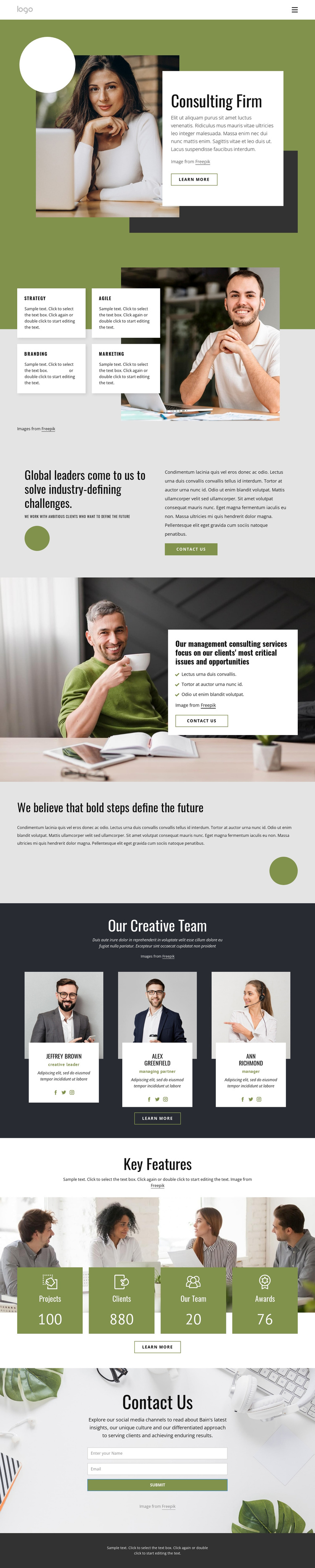
The four capability cards give this design a useful starting division for structured consulting content. Strategy, Agile, Branding, and Marketing are presented as separate focus areas beside a large business image, so each service category can remain visually distinct while belonging to the same page. The later management consulting section adds a second information layer through a three-item service list and a contact action, allowing more detailed service content to sit beneath the broader capability overview.
Navigation and recurring site regions can also be interpreted clearly from the page. The team showcase introduces three portrait cards with role labels, biographies, and Facebook, Twitter, and Instagram links, while the metrics area groups Projects, Clients, Our Team, and Awards into four labeled highlight cards. These repeated content areas are suitable for a Joomla-managed business site where service information, profile content, and site sections may need ongoing editorial organization. The final contact block provides a defined place for inquiry content, with fields for a visitor's name and email address. Together, the service groupings, team profiles, metrics, contact area, and shared footer create a practical content hierarchy for a Joomla implementation without treating sample names or figures as verified business facts.
Customize with Nicepage
Open this ready-made template in the Joomla Page Builder and customize it visually in the Nicepage editor. Replace demo content, edit page sections, and adapt the design to your project without rebuilding the template from scratch.
Work With This Template in Joomla
Customize and Install the Joomla Template
Start with this ready-made template instead of building the Joomla design from scratch. Customize its layout, content, typography, images, sections, and other design elements visually in the Nicepage application, then export and install the Joomla Template, Nicepage Extension, and supported content on your Joomla website.
Edit the Template Directly in Joomla
After installation, you can edit the Joomla Template directly in Joomla with the Nicepage Joomla Extension. Customize the Header, Footer, Colors, Fonts, typography, and Page Templates from the Joomla workflow while keeping the site design connected with your CMS content.
Edit Joomla Articles Visually
Use the Nicepage Joomla Extension to open and edit Joomla Articles visually from the Joomla Administrator. Change text, images, sections, layouts, and other page content in the Nicepage editor while continuing to manage the Articles through Joomla.
Joomla Content and Template Integration
Use the customized template together with Joomla Articles, module Positions, menus, forms, Blog Pages, and other supported CMS elements. With the Nicepage Extension used as the Site Style Source, shared design settings can be applied across Joomla Articles while Joomla continues to provide the CMS environment for managing site content.
This workflow combines a ready-made Joomla Template with visual customization, direct template editing in Joomla, and continued content management through the Nicepage Joomla Extension.





















