How to order cleaning Joomla Template


Two enquiry routes form a structured Joomla content section
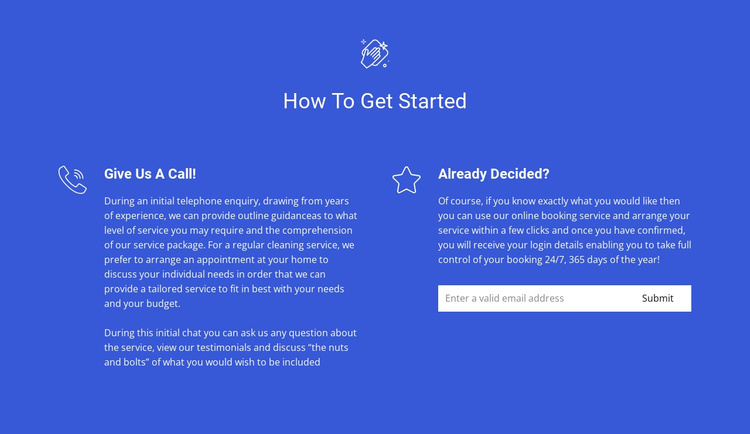
The centered “How To Get Started” heading introduces two distinct information units rather than presenting one undifferentiated service message. On the left, “Give Us A Call!” frames the first route around an initial telephone enquiry and a discussion of service requirements. On the right, “Already Decided?” explains the online booking route and places a compact email form beneath the supporting text. This separation makes the block suitable for structured cleaning-service information in a Joomla-managed page or site region.
The blue full-width background, white typography, and line icons give both options a shared visual treatment while preserving their different roles. The centered heading provides the entry point, and the left-aligned text beneath it keeps each route readable as its own content unit. The email input and submit control create a clear enquiry point for visitors following the online route, while the telephone option remains an explanatory alternative rather than being forced into the same interaction.
In a Joomla-oriented project, this block can function as a reusable service-information area alongside broader editorial content, navigation, and other page sections. Its headings, option descriptions, and contact control already provide a coherent section structure, while Joomla can provide the surrounding content-management context. The block therefore supports a practical enquiry stage without being treated as a complete Joomla site or template.
Customize with Nicepage
Open this ready-made template in the Joomla Page Builder and customize it visually in the Nicepage editor. Replace demo content, edit page sections, and adapt the design to your project without rebuilding the template from scratch.
Edit Template Offline
2. Create a new page or select existing
3. Click Add new block, search for id 323878 and click enter
Edit Template Online
Create Awesome Websites


Free Nicepage Builder
Keywords
Work With This Template in Joomla
Customize and Install the Joomla Template
Start with this ready-made template instead of building the Joomla design from scratch. Customize its layout, content, typography, images, sections, and other design elements visually in the Nicepage application, then export and install the Joomla Template, Nicepage Extension, and supported content on your Joomla website.
Edit the Template Directly in Joomla
After installation, you can edit the Joomla Template directly in Joomla with the Nicepage Joomla Extension. Customize the Header, Footer, Colors, Fonts, typography, and Page Templates from the Joomla workflow while keeping the site design connected with your CMS content.
Edit Joomla Articles Visually
Use the Nicepage Joomla Extension to open and edit Joomla Articles visually from the Joomla Administrator. Change text, images, sections, layouts, and other page content in the Nicepage editor while continuing to manage the Articles through Joomla.
Joomla Content and Template Integration
Use the customized template together with Joomla Articles, module Positions, menus, forms, Blog Pages, and other supported CMS elements. With the Nicepage Extension used as the Site Style Source, shared design settings can be applied across Joomla Articles while Joomla continues to provide the CMS environment for managing site content.
This workflow combines a ready-made Joomla Template with visual customization, direct template editing in Joomla, and continued content management through the Nicepage Joomla Extension.