Develop your business Joomla Template


Edit Template Offline
2. Create new page and search for id 32351
Edit Template Online
Create Awesome Websites


Free Nicepage Builder
Keywords
Strategy, branding, and contact regions for structured Joomla content
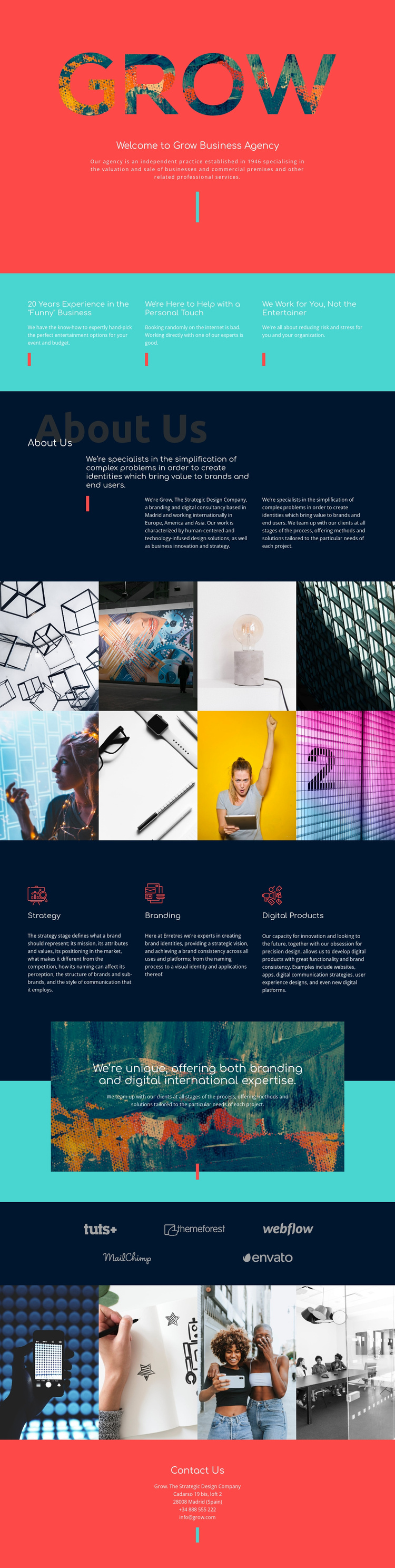
The opening coral block establishes the agency identity with a logo, introduction, and centered message before the page moves into three adjacent value statements. That progression creates a clear first content region for an agency site: visitors encounter the positioning, then the experience, support, and client-focus ideas that explain how the organization approaches its work.
The navy About Us area adds a second structured region, with three aligned text columns describing strategic design, the Madrid base, and international activity across Europe, America, and Asia. The turquoise capability block then separates Strategy, Branding, and Digital Products into recurring service content, while the two image panels and five-logo display provide distinct areas for visual material and partner or client marks. These sections can be interpreted as organized CMS content regions rather than one undifferentiated page.
The closing coral Contact Us section gathers the agency’s address, telephone number, and email into a defined response area. In a Joomla project, that separation gives menus and managed site content a practical visual framework: informational sections, service areas, image-led proof, and contact details each retain a recognizable place while sharing the same Header-to-Footer design direction. The result is a useful foundation for maintaining structured agency information without losing the page’s bold editorial rhythm.
Customize with Nicepage
Open this ready-made template in the Joomla Page Builder and customize it visually in the Nicepage editor. Replace demo content, edit page sections, and adapt the design to your project without rebuilding the template from scratch.
Work With This Template in Joomla
Customize and Install the Joomla Template
Start with this ready-made template instead of building the Joomla design from scratch. Customize its layout, content, typography, images, sections, and other design elements visually in the Nicepage application, then export and install the Joomla Template, Nicepage Extension, and supported content on your Joomla website.
Edit the Template Directly in Joomla
After installation, you can edit the Joomla Template directly in Joomla with the Nicepage Joomla Extension. Customize the Header, Footer, Colors, Fonts, typography, and Page Templates from the Joomla workflow while keeping the site design connected with your CMS content.
Edit Joomla Articles Visually
Use the Nicepage Joomla Extension to open and edit Joomla Articles visually from the Joomla Administrator. Change text, images, sections, layouts, and other page content in the Nicepage editor while continuing to manage the Articles through Joomla.
Joomla Content and Template Integration
Use the customized template together with Joomla Articles, module Positions, menus, forms, Blog Pages, and other supported CMS elements. With the Nicepage Extension used as the Site Style Source, shared design settings can be applied across Joomla Articles while Joomla continues to provide the CMS environment for managing site content.
This workflow combines a ready-made Joomla Template with visual customization, direct template editing in Joomla, and continued content management through the Nicepage Joomla Extension.