Jump and conquer Joomla Template



Five Retreat Inclusions Form a Structured Joomla Content Region
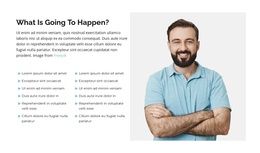
The five-item inclusion list gives this block a clear structured-information role for a Joomla-managed page. Rather than presenting a single undifferentiated paragraph, it separates the retreat into recognizable content points: a welcome circle and lectures, daily two-hour morning and afternoon practice, three spa massages, breakfast served throughout the retreat, and six nights of dormitory accommodation with four beds and an upgrade option.
That list works with the other two regions to create a compact content area. The left charcoal panel establishes the “Jump!” title and the July 25–31, 2021 date, the portrait image supplies visual context for the fitness retreat, and the right column carries the practical inclusion details. The spaced alignment makes the information easier to scan while preserving one connected section rather than turning each item into a separate page element.
In a Joomla-oriented project, this block can serve as a reusable retreat or event information region within a broader page. The content can sit alongside other managed material while the visual arrangement preserves the distinction between identification, imagery, and included services. It is especially suited to a page that needs a concise overview of what an experience provides before visitors move to fuller descriptions, schedules, or a separate registration area. The section remains one CMS-managed content presentation, not a complete Joomla site or template.
Customize with Nicepage
Open this ready-made template in the Joomla Page Builder and customize it visually in the Nicepage editor. Replace demo content, edit page sections, and adapt the design to your project without rebuilding the template from scratch.
Edit Template Offline
2. Create a new page or select existing
3. Click Add new block, search for id 310511 and click enter
Edit Template Online
Create Awesome Websites


Free Nicepage Builder
Keywords
Work With This Template in Joomla
Customize and Install the Joomla Template
Start with this ready-made template instead of building the Joomla design from scratch. Customize its layout, content, typography, images, sections, and other design elements visually in the Nicepage application, then export and install the Joomla Template, Nicepage Extension, and supported content on your Joomla website.
Edit the Template Directly in Joomla
After installation, you can edit the Joomla Template directly in Joomla with the Nicepage Joomla Extension. Customize the Header, Footer, Colors, Fonts, typography, and Page Templates from the Joomla workflow while keeping the site design connected with your CMS content.
Edit Joomla Articles Visually
Use the Nicepage Joomla Extension to open and edit Joomla Articles visually from the Joomla Administrator. Change text, images, sections, layouts, and other page content in the Nicepage editor while continuing to manage the Articles through Joomla.
Joomla Content and Template Integration
Use the customized template together with Joomla Articles, module Positions, menus, forms, Blog Pages, and other supported CMS elements. With the Nicepage Extension used as the Site Style Source, shared design settings can be applied across Joomla Articles while Joomla continues to provide the CMS environment for managing site content.
This workflow combines a ready-made Joomla Template with visual customization, direct template editing in Joomla, and continued content management through the Nicepage Joomla Extension.