Professional consulting services Joomla Template


Portrait and Company Copy Form a Structured Joomla Content Region
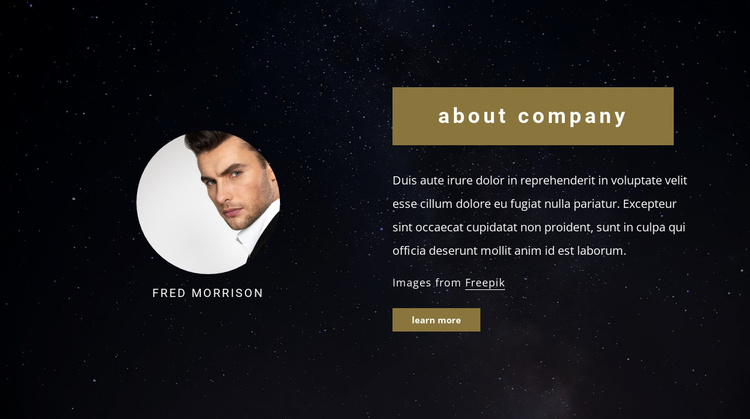
The block divides its company introduction into two related content groups. The left group combines a circular portrait with the “Fred Morrison” name label, creating a representative identity cue. The right group contains the “about company” heading, two paragraphs, and a “learn more” action, so the explanatory material and its follow-up destination remain together. This arrangement gives a Joomla-managed page a recognizable informational region without requiring the section to act as the entire site or template.
The dark starry background unifies both columns, while the light text treatment keeps the written content visually distinct. The muted gold rectangle behind the heading reappears in the button below, linking the introduction and action through a shared accent. Generous spacing preserves the boundary between the portrait content and the company copy, making the internal relationship easy to scan.
Within a broader Joomla project, this section can hold structured company information alongside other page content. The surrounding site may manage navigation and additional editorial areas, while this block retains its stable introduction role. Its two-column organization also makes the content easy to recognize as one reusable region rather than a loose collection of unrelated text and image elements.
Customize with Nicepage
Open this ready-made template in the Joomla Page Builder and customize it visually in the Nicepage editor. Replace demo content, edit page sections, and adapt the design to your project without rebuilding the template from scratch.
Edit Template Offline
2. Create a new page or select existing
3. Click Add new block, search for id 228551 and click enter
Edit Template Online
Create Awesome Websites


Free Nicepage Builder
Keywords
Work With This Template in Joomla
Customize and Install the Joomla Template
Start with this ready-made template instead of building the Joomla design from scratch. Customize its layout, content, typography, images, sections, and other design elements visually in the Nicepage application, then export and install the Joomla Template, Nicepage Extension, and supported content on your Joomla website.
Edit the Template Directly in Joomla
After installation, you can edit the Joomla Template directly in Joomla with the Nicepage Joomla Extension. Customize the Header, Footer, Colors, Fonts, typography, and Page Templates from the Joomla workflow while keeping the site design connected with your CMS content.
Edit Joomla Articles Visually
Use the Nicepage Joomla Extension to open and edit Joomla Articles visually from the Joomla Administrator. Change text, images, sections, layouts, and other page content in the Nicepage editor while continuing to manage the Articles through Joomla.
Joomla Content and Template Integration
Use the customized template together with Joomla Articles, module Positions, menus, forms, Blog Pages, and other supported CMS elements. With the Nicepage Extension used as the Site Style Source, shared design settings can be applied across Joomla Articles while Joomla continues to provide the CMS environment for managing site content.
This workflow combines a ready-made Joomla Template with visual customization, direct template editing in Joomla, and continued content management through the Nicepage Joomla Extension.