Design and development team Joomla Template


Edit Template Offline
2. Create new page and search for id 179700
Edit Template Online
Create Awesome Websites


Free Nicepage Builder
Keywords
Team Roles and Service Areas Create Structured Joomla Content Regions
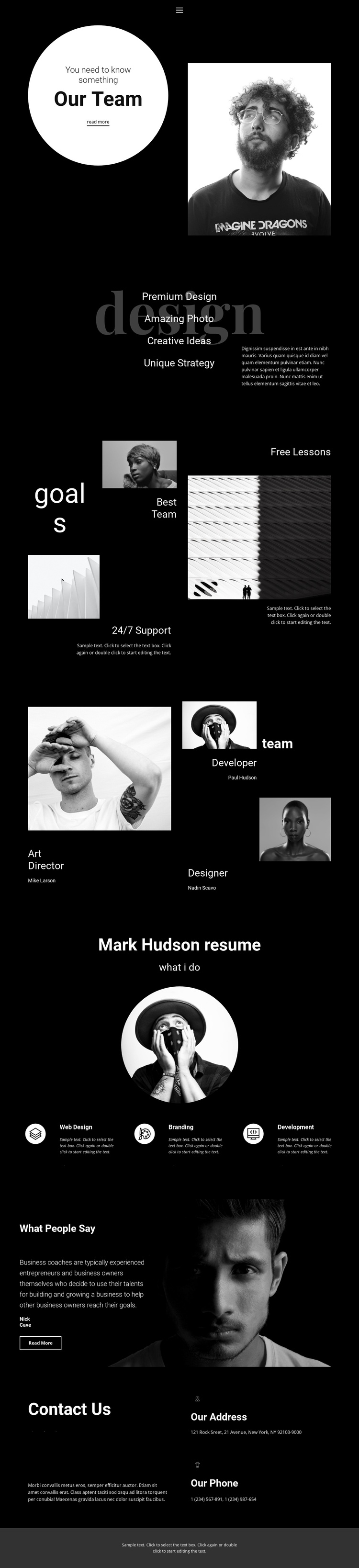
The team introduction, design statement, goals collage, and profile section divide the page into recognizable information regions. That division is useful for a Joomla-oriented project because the design does not depend on one uninterrupted block of text: visitors can encounter the team context first, then move through creative positioning, highlighted capabilities, and named roles. The three profiles—Art Director, Developer, and Designer—also create a repeatable pattern for presenting people without treating the demo names as verified business identities.
The resume section provides a second content structure built around three service cards: Web Design, Branding, and Development. These categories can serve as organized informational areas within a CMS-managed site, while the testimonial section adds a separate quote-and-attribution region before the closing contact content. The black-and-white palette, circular portraits, and asymmetric collage can remain the visual framework while the text and imagery in these regions are replaced with project-specific material.
Navigation, social links, address information, and phone details complete the shared site-oriented regions. Together, they give the design a practical relationship between menu access, recurring professional information, service content, and contact communication. The result is not merely a CMS label applied to a portfolio; it is a set of clearly separated content areas that can be adapted for structured Joomla-managed presentation while preserving the original editorial composition.
Customize with Nicepage
Open this ready-made template in the Joomla Page Builder and customize it visually in the Nicepage editor. Replace demo content, edit page sections, and adapt the design to your project without rebuilding the template from scratch.
Work With This Template in Joomla
Customize and Install the Joomla Template
Start with this ready-made template instead of building the Joomla design from scratch. Customize its layout, content, typography, images, sections, and other design elements visually in the Nicepage application, then export and install the Joomla Template, Nicepage Extension, and supported content on your Joomla website.
Edit the Template Directly in Joomla
After installation, you can edit the Joomla Template directly in Joomla with the Nicepage Joomla Extension. Customize the Header, Footer, Colors, Fonts, typography, and Page Templates from the Joomla workflow while keeping the site design connected with your CMS content.
Edit Joomla Articles Visually
Use the Nicepage Joomla Extension to open and edit Joomla Articles visually from the Joomla Administrator. Change text, images, sections, layouts, and other page content in the Nicepage editor while continuing to manage the Articles through Joomla.
Joomla Content and Template Integration
Use the customized template together with Joomla Articles, module Positions, menus, forms, Blog Pages, and other supported CMS elements. With the Nicepage Extension used as the Site Style Source, shared design settings can be applied across Joomla Articles while Joomla continues to provide the CMS environment for managing site content.
This workflow combines a ready-made Joomla Template with visual customization, direct template editing in Joomla, and continued content management through the Nicepage Joomla Extension.