Inspiration from IKEA Joomla Template


Edit Template Offline
2. Create new page and search for id 17262
Edit Template Online
Create Awesome Websites


Free Nicepage Builder
Keywords
Furniture Features Divide Naturally Into Managed Content Regions
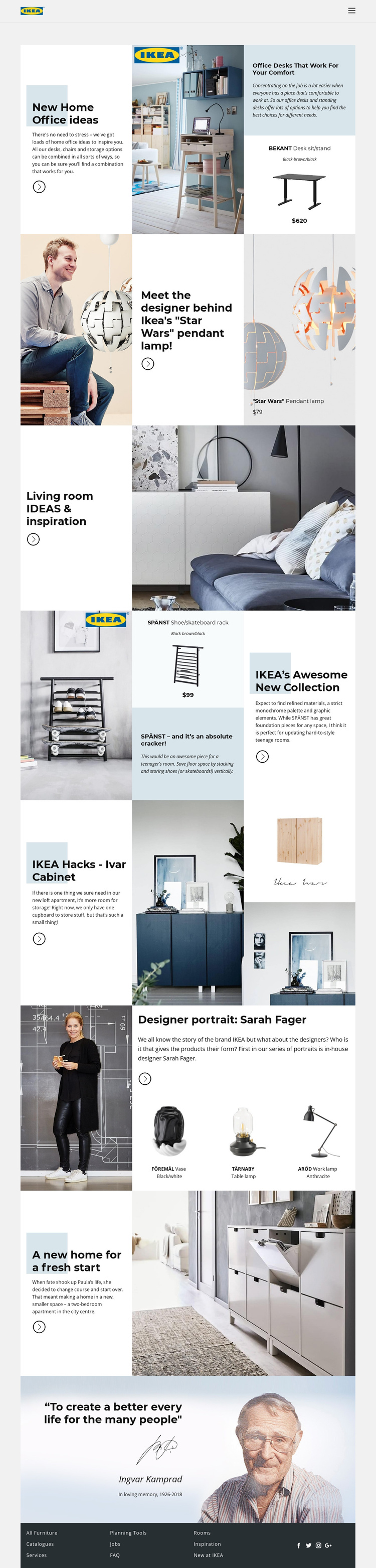
The page separates furnishing information into recurring editorial regions that can be understood as structured site content. Home-office ideas are connected to the BEKANT desk and a room image, while the pendant-lamp section combines a designer reference with a named lighting product. The living-room and Ivar cabinet sections provide broader inspiration areas, and the SPÄNST feature adds a collection-focused region with a rack, product panel, and explanatory text.
The Sarah Fager section offers a different content relationship: a designer portrait and biography lead into three separately presented products, FÖREMÅL, TÄRNABY, and ARÖD. Together with the apartment story, these areas create distinct information groups that could remain visually coordinated while their text, images, and product references are maintained as separate site content. The header navigation and dark footer add shared regions for moving between furniture, services, planning tools, rooms, inspiration, and other destinations.
For a Joomla project, this organization is useful because it gives structured content a visible place within the design instead of treating the page as one uninterrupted article. The Joomla Extension can provide a product-specific editing bridge, but the template-specific value comes from the existing separation between product stories, designer information, home narratives, and shared navigation.
Customize with Nicepage
Open this ready-made template in the Joomla Page Builder and customize it visually in the Nicepage editor. Replace demo content, edit page sections, and adapt the design to your project without rebuilding the template from scratch.
Work With This Template in Joomla
Customize and Install the Joomla Template
Start with this ready-made template instead of building the Joomla design from scratch. Customize its layout, content, typography, images, sections, and other design elements visually in the Nicepage application, then export and install the Joomla Template, Nicepage Extension, and supported content on your Joomla website.
Edit the Template Directly in Joomla
After installation, you can edit the Joomla Template directly in Joomla with the Nicepage Joomla Extension. Customize the Header, Footer, Colors, Fonts, typography, and Page Templates from the Joomla workflow while keeping the site design connected with your CMS content.
Edit Joomla Articles Visually
Use the Nicepage Joomla Extension to open and edit Joomla Articles visually from the Joomla Administrator. Change text, images, sections, layouts, and other page content in the Nicepage editor while continuing to manage the Articles through Joomla.
Joomla Content and Template Integration
Use the customized template together with Joomla Articles, module Positions, menus, forms, Blog Pages, and other supported CMS elements. With the Nicepage Extension used as the Site Style Source, shared design settings can be applied across Joomla Articles while Joomla continues to provide the CMS environment for managing site content.
This workflow combines a ready-made Joomla Template with visual customization, direct template editing in Joomla, and continued content management through the Nicepage Joomla Extension.