English no rules school Joomla Template


Edit Template Offline
2. Create new page and search for id 119405
Edit Template Online
Create Awesome Websites


Free Nicepage Builder
Keywords
Instructional sections and contact regions suit structured CMS content
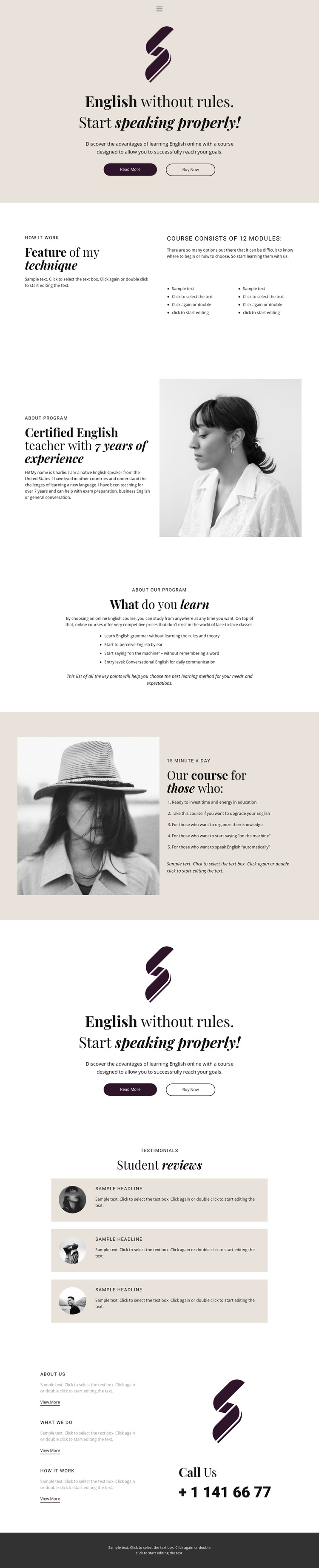
The teaching technique section already divides the course explanation into a heading, supporting details, two lists, and a module reference. That makes it a useful structured content area for an education site where course information may need to remain separate from the instructor profile and learning outcomes. The instructor section contributes another distinct region, pairing biographical text with a portrait, while the four-item outcomes block provides a compact way to present recurring educational information.
The audience section adds a different content relationship: five statements are grouped beside a portrait and a daily-study reference. Together, these sections create recognizable information regions that can be connected through the page’s sparse navigation without flattening the content into one long text field. The three student review cards provide a repeated content pattern, and the closing About Us, What We Do, and How It Work cards create additional structured destinations before the phone contact. In a Joomla project, these areas could be interpreted as coordinated CMS-managed content regions while the shared navigation and footer maintain the visual frame. The design analysis does not claim that Joomla Articles, categories, or module positions already exist; it describes how the confirmed sections could fit a structured Joomla content environment.
Customize with Nicepage
Open this ready-made template in the Joomla Page Builder and customize it visually in the Nicepage editor. Replace demo content, edit page sections, and adapt the design to your project without rebuilding the template from scratch.
Work With This Template in Joomla
Customize and Install the Joomla Template
Start with this ready-made template instead of building the Joomla design from scratch. Customize its layout, content, typography, images, sections, and other design elements visually in the Nicepage application, then export and install the Joomla Template, Nicepage Extension, and supported content on your Joomla website.
Edit the Template Directly in Joomla
After installation, you can edit the Joomla Template directly in Joomla with the Nicepage Joomla Extension. Customize the Header, Footer, Colors, Fonts, typography, and Page Templates from the Joomla workflow while keeping the site design connected with your CMS content.
Edit Joomla Articles Visually
Use the Nicepage Joomla Extension to open and edit Joomla Articles visually from the Joomla Administrator. Change text, images, sections, layouts, and other page content in the Nicepage editor while continuing to manage the Articles through Joomla.
Joomla Content and Template Integration
Use the customized template together with Joomla Articles, module Positions, menus, forms, Blog Pages, and other supported CMS elements. With the Nicepage Extension used as the Site Style Source, shared design settings can be applied across Joomla Articles while Joomla continues to provide the CMS environment for managing site content.
This workflow combines a ready-made Joomla Template with visual customization, direct template editing in Joomla, and continued content management through the Nicepage Joomla Extension.