Advanced Surf Lessons WordPress Theme


Surf Lesson Topics Form a Stable Page Content Region
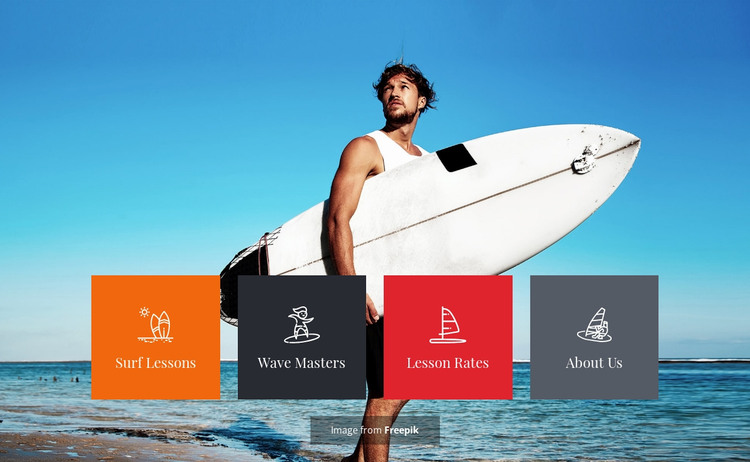
The four-tile arrangement reads naturally as stable informational content for a WordPress-managed page. Surf Lessons and Wave Masters identify instructional subjects, Lesson Rates points toward practical service information, and About Us supplies a broader identity topic. These labels give the section a durable content role that can sit on a services, recreation, or surf-school page while other page areas carry fuller descriptions and response details.
Its visual organization supports that role without depending on a particular CMS item type. The ocean-and-sky photograph establishes the subject immediately, and the surfer with a white surfboard reinforces the water-sports setting. Over the image, the equal tiles create four bounded content areas. Their distinct orange, dark charcoal, red, and gray backgrounds separate the topics, while the repeated centered icon and serif label treatment keeps the group visually consistent.
Within a WordPress project, this section can remain a recognizable page-content unit as text, imagery, and surrounding page material evolve. The block does not need to become a theme or define the site structure; it contributes one focused visual region. Its clear labels also make it easier to coordinate the section with neighboring content such as detailed lesson explanations, rate information, instructor material, or contact content maintained elsewhere in the broader site.
Customize with Nicepage
Open this ready-made template in the WordPress Website Builder and customize it visually in the Nicepage editor. Replace demo content, edit page sections, and adapt the design to your project without rebuilding the template from scratch.
Edit Template Offline
2. Create a new page or select existing
3. Click Add new block, search for id 74274 and click enter
Edit Template Online
Create Awesome Websites


Free Nicepage Builder
Keywords
Manage and Edit This Theme in WordPress
Customize and Install the WordPress Theme
Start with this ready-made theme instead of building the WordPress design from scratch. Customize its layout, content, typography, images, sections, and other design elements visually in Nicepage editor, then export and install the WordPress Theme, Plugin, and Pages on your WordPress site. The Nicepage WordPress Plugin lets you continue working with the site after installation.
Edit the Theme Directly in WordPress
After installation, you can edit the WordPress Theme directly in WordPress with the Nicepage WordPress Plugin. Use Site Style to customize site Colors, Fonts, Header, Footer, Blog, and Post Page Templates while working within your WordPress website.
Edit WordPress Pages Visually
Use the Nicepage WordPress Plugin to edit page content directly from the WordPress admin area. Open a WordPress Page with Nicepage and visually change its text, images, sections, and other page elements while continuing to manage the Page through WordPress.
WordPress Content and Theme Integration
Use the customized theme with WordPress Pages, Posts, Blog and Post Templates, menus, widgets, and other CMS-managed content. Shared theme elements such as Colors, Fonts, Header, Footer, Blog, and Post Page Templates can be managed as part of the overall site design, while WordPress provides the CMS environment for managing site content.
This workflow combines a ready-made WordPress Theme with visual customization, direct theme editing in WordPress, and continued content management through the Nicepage WordPress Plugin.