
Offline Page Website WordPress Theme


Edit Template Offline
2. Create new page and search for id 6658534
Edit Template Online
Create Awesome Websites


Free Nicepage Builder
Keywords
Page Content Separates Service Status from Return Communication
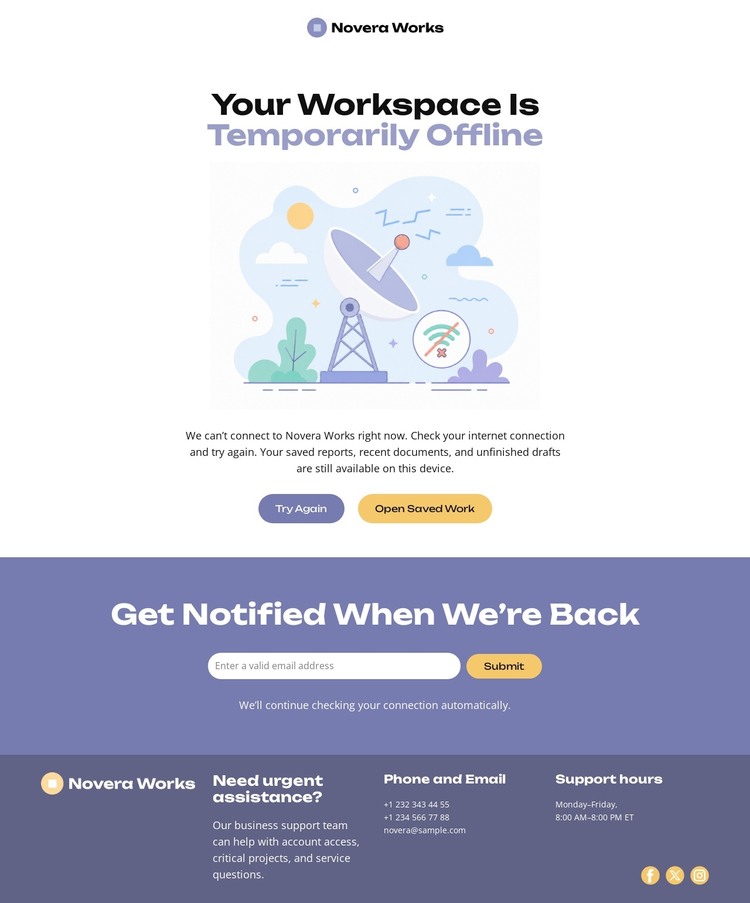
The design contains clear page-oriented content that can be interpreted in a WordPress environment without assuming that blog or post structures already exist. The central section carries the lasting service message: the workspace is temporarily offline, illustrated and explained before visitors reach Try Again and Open Saved Work. The notification section provides a separate content and interaction area for collecting email requests related to the service’s return. The footer then gathers support hours, phone and email channels, urgent-assistance wording, and social links.
This separation helps distinguish the kinds of information a WordPress-managed page may need to present. The outage statement and recovery labels can remain part of the primary page content, while the signup wording and support details can be updated as operational information changes. The centered layout and soft lavender treatment keep those areas visually connected, but their different roles remain readable: status first, follow-up second, direct assistance last.
The design can therefore support a WordPress-oriented content environment as a focused service page rather than as an assumed blog or news layout. If a project later adds regular announcements, those could be introduced alongside this permanent outage structure, but the verified template itself is best understood through its existing status message, recovery actions, notification form, and support footer.
Customize with Nicepage
Open this ready-made template in the WordPress Website Builder and customize it visually in the Nicepage editor. Replace demo content, edit page sections, and adapt the design to your project without rebuilding the template from scratch.
Manage and Edit This Theme in WordPress
Customize and Install the WordPress Theme
Start with this ready-made theme instead of building the WordPress design from scratch. Customize its layout, content, typography, images, sections, and other design elements visually in Nicepage editor, then export and install the WordPress Theme, Plugin, and Pages on your WordPress site. The Nicepage WordPress Plugin lets you continue working with the site after installation.
Edit the Theme Directly in WordPress
After installation, you can edit the WordPress Theme directly in WordPress with the Nicepage WordPress Plugin. Use Site Style to customize site Colors, Fonts, Header, Footer, Blog, and Post Page Templates while working within your WordPress website.
Edit WordPress Pages Visually
Use the Nicepage WordPress Plugin to edit page content directly from the WordPress admin area. Open a WordPress Page with Nicepage and visually change its text, images, sections, and other page elements while continuing to manage the Page through WordPress.
WordPress Content and Theme Integration
Use the customized theme with WordPress Pages, Posts, Blog and Post Templates, menus, widgets, and other CMS-managed content. Shared theme elements such as Colors, Fonts, Header, Footer, Blog, and Post Page Templates can be managed as part of the overall site design, while WordPress provides the CMS environment for managing site content.
This workflow combines a ready-made WordPress Theme with visual customization, direct theme editing in WordPress, and continued content management through the Nicepage WordPress Plugin.
