Better Decisions Through Feedback WordPress Theme


Structured Health Questions as Reusable WordPress Page Content
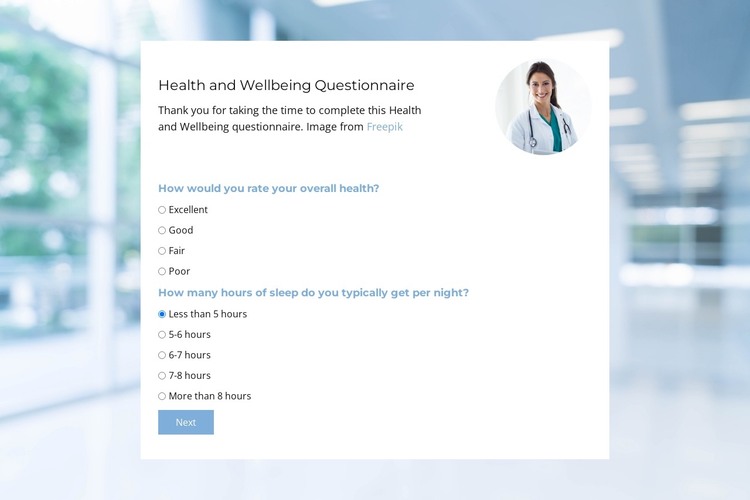
The heading and supporting paragraph give this block the character of stable page content rather than a time-sensitive article stream. The centered card then organizes a health and wellbeing questionnaire into explicit response groups: the visible step asks about overall health and typical nightly sleep duration, while the HTML includes a second step concerning health issues during the previous six months. Radio choices make each question a defined content unit that can remain readable within a WordPress-managed page.
The block can serve as one reusable assessment or intake area while the wider WordPress project handles other page content around it. The circular portrait adds a human visual cue beside the introduction, and the healthcare background establishes context without changing the section’s core content role. Next marks movement through the questionnaire, while Submit belongs to the later response stage represented in the HTML.
The design also offers a consistent visual wrapper for this page content: a white card, soft blue labels, pale gray balance, dark heading text, and generous spacing. These details help the questionnaire remain recognizable when placed beside other sections with different functions. In a WordPress-oriented project, the section can therefore support a stable health page or wellbeing resource while remaining one content block within the broader theme and site.
Customize with Nicepage
Open this ready-made template in the WordPress Website Builder and customize it visually in the Nicepage editor. Replace demo content, edit page sections, and adapt the design to your project without rebuilding the template from scratch.
Edit Template Offline
2. Create a new page or select existing
3. Click Add new block, search for id 6537807 and click enter
Edit Template Online
Create Awesome Websites


Free Nicepage Builder
Keywords
Manage and Edit This Theme in WordPress
Customize and Install the WordPress Theme
Start with this ready-made theme instead of building the WordPress design from scratch. Customize its layout, content, typography, images, sections, and other design elements visually in Nicepage editor, then export and install the WordPress Theme, Plugin, and Pages on your WordPress site. The Nicepage WordPress Plugin lets you continue working with the site after installation.
Edit the Theme Directly in WordPress
After installation, you can edit the WordPress Theme directly in WordPress with the Nicepage WordPress Plugin. Use Site Style to customize site Colors, Fonts, Header, Footer, Blog, and Post Page Templates while working within your WordPress website.
Edit WordPress Pages Visually
Use the Nicepage WordPress Plugin to edit page content directly from the WordPress admin area. Open a WordPress Page with Nicepage and visually change its text, images, sections, and other page elements while continuing to manage the Page through WordPress.
WordPress Content and Theme Integration
Use the customized theme with WordPress Pages, Posts, Blog and Post Templates, menus, widgets, and other CMS-managed content. Shared theme elements such as Colors, Fonts, Header, Footer, Blog, and Post Page Templates can be managed as part of the overall site design, while WordPress provides the CMS environment for managing site content.
This workflow combines a ready-made WordPress Theme with visual customization, direct theme editing in WordPress, and continued content management through the Nicepage WordPress Plugin.