Your growth strategy WordPress Theme



Stable Page Content Connects Company Context With Four Themes
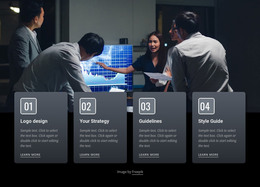
The photograph of five business professionals gives the section a clear company-facing context, while the four repeated tiles organize the content into stable page themes: About Us, Agile, Strategy, and Digital. In a WordPress-oriented project, this structure can fit permanent page content such as an introduction to an organization or a concise overview of its capabilities. The labels are short enough to scan quickly, and the circular icons provide a repeated visual cue that helps visitors distinguish the four content areas.
The tiles overlap the lower edge of the image instead of sitting in a separate area beneath it. That relationship lets the block connect people-focused presentation with the topics that explain the organization’s direction. Alternating dark neutral backgrounds create item-level separation, while the shared typography and icon placement maintain a consistent visual pattern. The block can therefore remain a defined content region within a WordPress-managed page while longer descriptions, articles, or additional service information are handled elsewhere in the project.
Its static interaction keeps the meaning visible without requiring visitors to open controls or move through slides. The section is especially suited to a stable page role: an introductory capabilities area that can remain visually consistent as surrounding WordPress-managed content develops. The reusable value lies in the relationship between one strong image and four clearly named themes, not in claiming that the block itself supplies a complete theme or site.
Customize with Nicepage
Open this ready-made template in the WordPress Website Builder and customize it visually in the Nicepage editor. Replace demo content, edit page sections, and adapt the design to your project without rebuilding the template from scratch.
Edit Template Offline
2. Create a new page or select existing
3. Click Add new block, search for id 60904 and click enter
Edit Template Online
Create Awesome Websites


Free Nicepage Builder
Keywords
Manage and Edit This Theme in WordPress
Customize and Install the WordPress Theme
Start with this ready-made theme instead of building the WordPress design from scratch. Customize its layout, content, typography, images, sections, and other design elements visually in Nicepage editor, then export and install the WordPress Theme, Plugin, and Pages on your WordPress site. The Nicepage WordPress Plugin lets you continue working with the site after installation.
Edit the Theme Directly in WordPress
After installation, you can edit the WordPress Theme directly in WordPress with the Nicepage WordPress Plugin. Use Site Style to customize site Colors, Fonts, Header, Footer, Blog, and Post Page Templates while working within your WordPress website.
Edit WordPress Pages Visually
Use the Nicepage WordPress Plugin to edit page content directly from the WordPress admin area. Open a WordPress Page with Nicepage and visually change its text, images, sections, and other page elements while continuing to manage the Page through WordPress.
WordPress Content and Theme Integration
Use the customized theme with WordPress Pages, Posts, Blog and Post Templates, menus, widgets, and other CMS-managed content. Shared theme elements such as Colors, Fonts, Header, Footer, Blog, and Post Page Templates can be managed as part of the overall site design, while WordPress provides the CMS environment for managing site content.
This workflow combines a ready-made WordPress Theme with visual customization, direct theme editing in WordPress, and continued content management through the Nicepage WordPress Plugin.