Headline and two columns WordPress Theme


Stable Page Content for Values and Organisational Affiliations
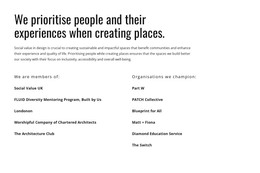
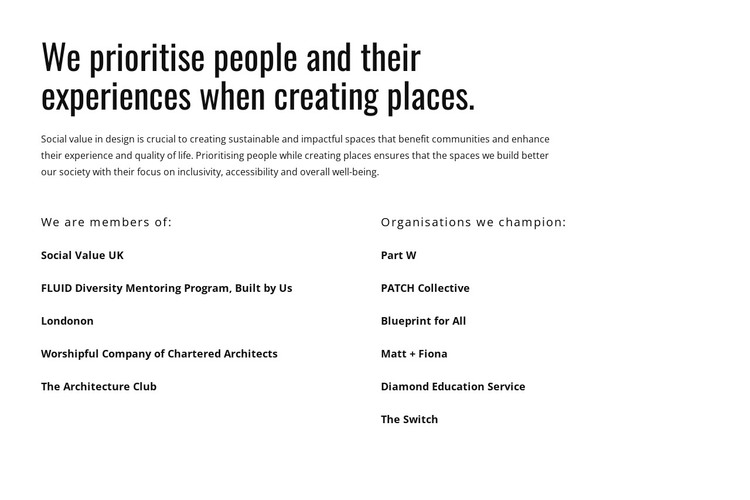
The heading and supporting paragraph form durable page content: they describe a people-focused approach to creating places and explain it through inclusivity, accessibility, community benefit, and well-being. That message is not dependent on a dated post or changing feed, so it can remain a stable section on a practice, organisation, or design-focused page managed through WordPress.
The two affiliation groups add structured detail to the message. The first column, labeled “We are members of:”, contains five named organisations or programmes, including Social Value UK and the Worshipful Company of Chartered Architects. The second, labeled “Organisations we champion:”, contains six entries, including Blueprint for All. Their parallel placement gives the content a repeatable visual pattern while keeping membership separate from advocacy. The section’s static behavior and clear typography suit information that visitors may revisit as part of a permanent page.
In a WordPress-oriented project, this block can occupy one reusable content region within a wider theme and page structure. The surrounding site can handle navigation, additional pages, and other managed content, while this section preserves its specific values-and-affiliations role. Its visual arrangement can remain consistent when the page is updated because the core relationship between the introductory principle and the two organization lists is independent of any single publication cycle.
Customize with Nicepage
Open this ready-made template in the WordPress Website Builder and customize it visually in the Nicepage editor. Replace demo content, edit page sections, and adapt the design to your project without rebuilding the template from scratch.
Edit Template Offline
2. Create a new page or select existing
3. Click Add new block, search for id 4459536 and click enter
Edit Template Online
Create Awesome Websites


Free Nicepage Builder
Keywords
Manage and Edit This Theme in WordPress
Customize and Install the WordPress Theme
Start with this ready-made theme instead of building the WordPress design from scratch. Customize its layout, content, typography, images, sections, and other design elements visually in Nicepage editor, then export and install the WordPress Theme, Plugin, and Pages on your WordPress site. The Nicepage WordPress Plugin lets you continue working with the site after installation.
Edit the Theme Directly in WordPress
After installation, you can edit the WordPress Theme directly in WordPress with the Nicepage WordPress Plugin. Use Site Style to customize site Colors, Fonts, Header, Footer, Blog, and Post Page Templates while working within your WordPress website.
Edit WordPress Pages Visually
Use the Nicepage WordPress Plugin to edit page content directly from the WordPress admin area. Open a WordPress Page with Nicepage and visually change its text, images, sections, and other page elements while continuing to manage the Page through WordPress.
WordPress Content and Theme Integration
Use the customized theme with WordPress Pages, Posts, Blog and Post Templates, menus, widgets, and other CMS-managed content. Shared theme elements such as Colors, Fonts, Header, Footer, Blog, and Post Page Templates can be managed as part of the overall site design, while WordPress provides the CMS environment for managing site content.
This workflow combines a ready-made WordPress Theme with visual customization, direct theme editing in WordPress, and continued content management through the Nicepage WordPress Plugin.