The newsletter WordPress Theme


Stable Signup Content With Reusable Contact Information
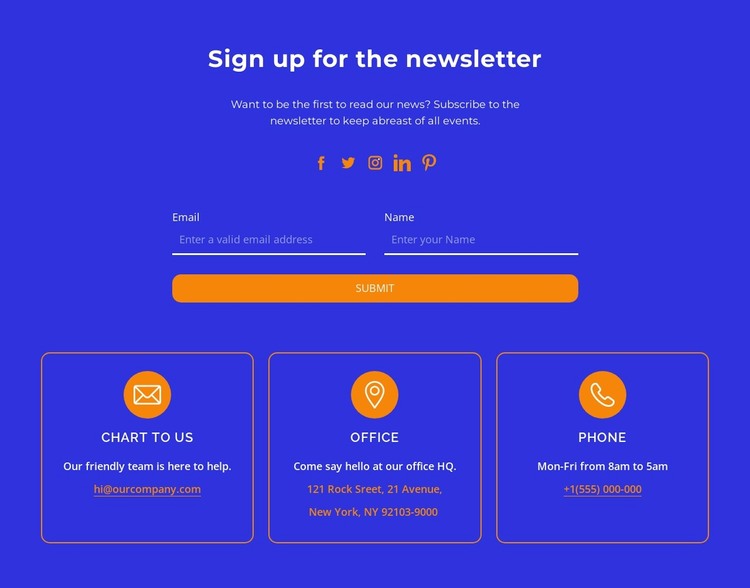
The heading, supporting paragraph, and two-field form read as stable page content rather than a temporary editorial entry. “Sign up for the newsletter” states the section’s purpose, while the name and email inputs define the information requested before the single submit button. Five social-link icons provide a compact secondary connection route, keeping the block useful as a repeatable communication area within a WordPress-managed page.
The three contact cards add a separate content pattern that can remain consistent wherever the section is used. “Chart to us,” “Office,” and “Phone” divide direct contact information into recognizable categories, with each card combining an icon, label, description, and linked detail. Their equal horizontal arrangement supports quick comparison, while the centered introduction keeps the newsletter message as the first point of attention.
The visual treatment helps this page section retain a clear identity inside a broader WordPress project. The blue background carries the whole composition, orange outlines and icons distinguish the cards, and the orange rounded submit button marks the response point. White typography and generous vertical spacing preserve readability across the three content groups. The section can therefore serve as stable newsletter or contact content on a page while the surrounding WordPress-managed site handles other pages, editorial material, and wider theme structure.
Customize with Nicepage
Open this ready-made template in the WordPress Website Builder and customize it visually in the Nicepage editor. Replace demo content, edit page sections, and adapt the design to your project without rebuilding the template from scratch.
Edit Template Offline
2. Create a new page or select existing
3. Click Add new block, search for id 3058687 and click enter
Edit Template Online
Create Awesome Websites


Free Nicepage Builder
Keywords
Manage and Edit This Theme in WordPress
Customize and Install the WordPress Theme
Start with this ready-made theme instead of building the WordPress design from scratch. Customize its layout, content, typography, images, sections, and other design elements visually in Nicepage editor, then export and install the WordPress Theme, Plugin, and Pages on your WordPress site. The Nicepage WordPress Plugin lets you continue working with the site after installation.
Edit the Theme Directly in WordPress
After installation, you can edit the WordPress Theme directly in WordPress with the Nicepage WordPress Plugin. Use Site Style to customize site Colors, Fonts, Header, Footer, Blog, and Post Page Templates while working within your WordPress website.
Edit WordPress Pages Visually
Use the Nicepage WordPress Plugin to edit page content directly from the WordPress admin area. Open a WordPress Page with Nicepage and visually change its text, images, sections, and other page elements while continuing to manage the Page through WordPress.
WordPress Content and Theme Integration
Use the customized theme with WordPress Pages, Posts, Blog and Post Templates, menus, widgets, and other CMS-managed content. Shared theme elements such as Colors, Fonts, Header, Footer, Blog, and Post Page Templates can be managed as part of the overall site design, while WordPress provides the CMS environment for managing site content.
This workflow combines a ready-made WordPress Theme with visual customization, direct theme editing in WordPress, and continued content management through the Nicepage WordPress Plugin.