Various text groups WordPress Theme


Long-Form Page Content With a Distinct Supporting Callout
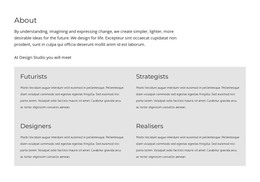
The left-side heading gives this section a stable page-content identity, while the two right-side text areas provide room for a longer explanation. That arrangement is useful when written material needs more emphasis than a standard paragraph but should remain within one recognizable content region. The large type on the left establishes the subject visually; the smaller copy on the right carries the main detail, creating a clear separation between introduction and explanation.
The blue callout below the right side changes the rhythm of the section without adding a new interactive component. Its rectangular background and bright color mark the paragraph as a related note, conclusion, quotation, or other highlighted passage, while its limited width keeps the emphasis local to the text column. The light gray background and generous empty space prevent the three written areas from merging into one dense block, and the black typography maintains a strong contrast throughout.
For a WordPress-managed project, this design can function as stable content on a page while other areas of the site handle navigation, additional sections, or regularly updated material. The block contributes a defined heading, supporting copy, and visual callout pattern that can remain consistent as part of the surrounding page design.
Customize with Nicepage
Open this ready-made template in the WordPress Website Builder and customize it visually in the Nicepage editor. Replace demo content, edit page sections, and adapt the design to your project without rebuilding the template from scratch.
Edit Template Offline
2. Create a new page or select existing
3. Click Add new block, search for id 1728813 and click enter
Edit Template Online
Create Awesome Websites


Free Nicepage Builder
Keywords
Manage and Edit This Theme in WordPress
Customize and Install the WordPress Theme
Start with this ready-made theme instead of building the WordPress design from scratch. Customize its layout, content, typography, images, sections, and other design elements visually in Nicepage editor, then export and install the WordPress Theme, Plugin, and Pages on your WordPress site. The Nicepage WordPress Plugin lets you continue working with the site after installation.
Edit the Theme Directly in WordPress
After installation, you can edit the WordPress Theme directly in WordPress with the Nicepage WordPress Plugin. Use Site Style to customize site Colors, Fonts, Header, Footer, Blog, and Post Page Templates while working within your WordPress website.
Edit WordPress Pages Visually
Use the Nicepage WordPress Plugin to edit page content directly from the WordPress admin area. Open a WordPress Page with Nicepage and visually change its text, images, sections, and other page elements while continuing to manage the Page through WordPress.
WordPress Content and Theme Integration
Use the customized theme with WordPress Pages, Posts, Blog and Post Templates, menus, widgets, and other CMS-managed content. Shared theme elements such as Colors, Fonts, Header, Footer, Blog, and Post Page Templates can be managed as part of the overall site design, while WordPress provides the CMS environment for managing site content.
This workflow combines a ready-made WordPress Theme with visual customization, direct theme editing in WordPress, and continued content management through the Nicepage WordPress Plugin.