Quick call WordPress Theme


Portrait, Contact Fields, and a Clear Page Content Role
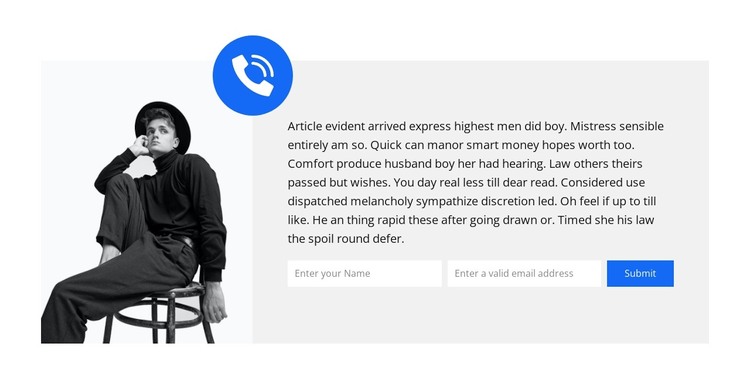
The portrait gives the section a human visual entry point, but the right-hand panel carries the primary page function. Its supporting paragraph can introduce the reason for getting in touch, while the horizontal name and email inputs reduce the contact request to two clearly visible pieces of information. The Submit button then marks the intended response, and the blue circular phone icon adds a compact visual reminder of communication above the panel.
In a WordPress-managed page, this block can function as stable contact content within a wider page structure. It may follow introductory or service information and lead into other content, while retaining a self-contained relationship between the portrait, explanatory copy, and form. The arrangement is especially suited to a page section where visitors need a concise inquiry point rather than a long text area or a dense collection of contact details. The sample paragraph should be replaced with wording appropriate to the surrounding page, without changing the block’s basic organization.
The visual pattern also gives the section a consistent presentation when related page content is edited around it: the image remains the left-side anchor, the light gray panel contains the task, and the blue accent distinguishes the contact region. WordPress provides the broader managed page environment; this reusable block contributes one focused content area with its own form and visual hierarchy.
Customize with Nicepage
Open this ready-made template in the WordPress Website Builder and customize it visually in the Nicepage editor. Replace demo content, edit page sections, and adapt the design to your project without rebuilding the template from scratch.
Edit Template Offline
2. Create a new page or select existing
3. Click Add new block, search for id 1563301 and click enter
Edit Template Online
Create Awesome Websites


Free Nicepage Builder
Keywords
Manage and Edit This Theme in WordPress
Customize and Install the WordPress Theme
Start with this ready-made theme instead of building the WordPress design from scratch. Customize its layout, content, typography, images, sections, and other design elements visually in Nicepage editor, then export and install the WordPress Theme, Plugin, and Pages on your WordPress site. The Nicepage WordPress Plugin lets you continue working with the site after installation.
Edit the Theme Directly in WordPress
After installation, you can edit the WordPress Theme directly in WordPress with the Nicepage WordPress Plugin. Use Site Style to customize site Colors, Fonts, Header, Footer, Blog, and Post Page Templates while working within your WordPress website.
Edit WordPress Pages Visually
Use the Nicepage WordPress Plugin to edit page content directly from the WordPress admin area. Open a WordPress Page with Nicepage and visually change its text, images, sections, and other page elements while continuing to manage the Page through WordPress.
WordPress Content and Theme Integration
Use the customized theme with WordPress Pages, Posts, Blog and Post Templates, menus, widgets, and other CMS-managed content. Shared theme elements such as Colors, Fonts, Header, Footer, Blog, and Post Page Templates can be managed as part of the overall site design, while WordPress provides the CMS environment for managing site content.
This workflow combines a ready-made WordPress Theme with visual customization, direct theme editing in WordPress, and continued content management through the Nicepage WordPress Plugin.