Stock Market Investment Template


Edit Template Offline
2. Create new page and search for id 6669182
Edit Template Online
Create Awesome Websites


Free Nicepage Builder
Keywords
Three Investment Services Anchor a Broad Market Story
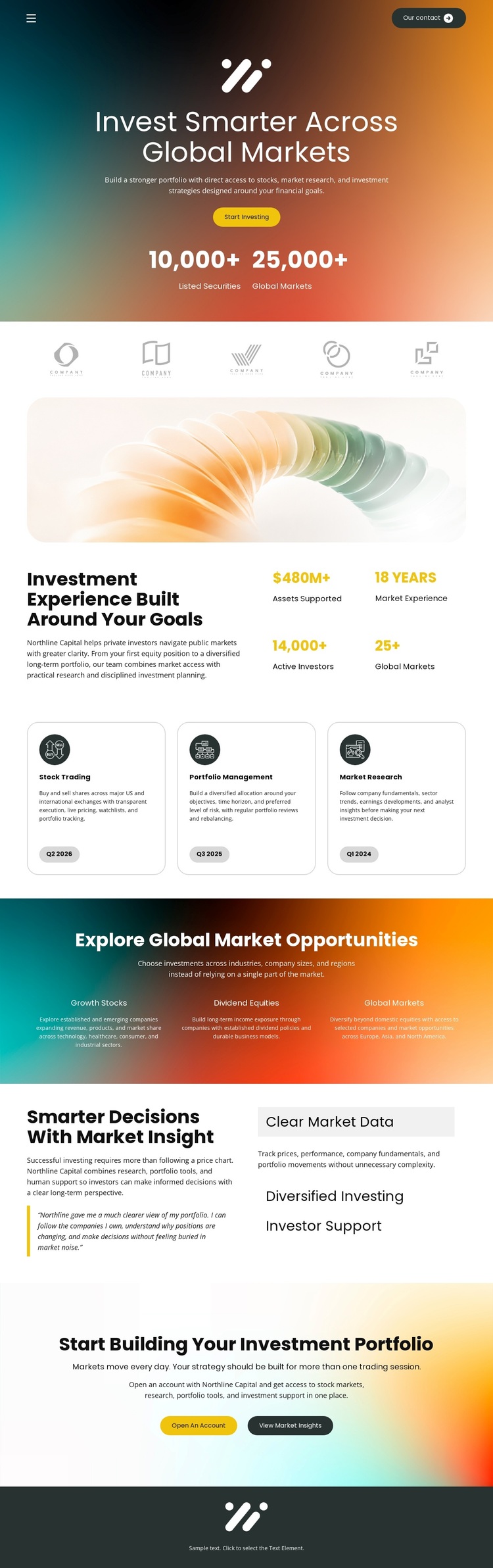
The design’s strongest selection signal is the way it combines a concise financial-services message with several related content angles. Stock Trading, Portfolio Management, and Market Research appear as three distinct service cards, giving the page more coverage than a layout centered on only one investment offer. Around those cards, the template places an overview panel, abstract market imagery, and displayed metrics to create a transition from the general investment experience to specific services.
The global-opportunities section adds another reason to choose this design when market scope matters. Growth Stocks, Emerging Markets, and Global Markets are presented as separate categories on a vivid gradient background, making the page suitable for content that needs to distinguish several investment directions. The later research area balances that visual breadth with Clear Market Data, Diversified Investing, and Investor Support, so the page can address both opportunity and decision support.
Its action coverage is also unusually clear for a single-page starting point. Start Investing and Learn More appear near the beginning, while Open an Account and View Market Insights return at the portfolio-building close. Rounded cards, bold sans-serif typography, abstract financial imagery, and contrasting dark, teal, orange, and cream surfaces reinforce the subject without forcing a narrow visual style. Together, these relationships make the template a useful option for investment projects that need services, market context, research themes, and next steps in one design.
Customize with Nicepage
Open this ready-made template in the Template Builder and customize it visually in the Nicepage editor. Replace demo content, edit page sections, and adapt the design to your project without rebuilding the template from scratch.
Start With a Ready-Made Template
Choose a Design for a New Page
Use a ready-made template as a starting point instead of creating every page from a blank canvas. When adding a new page in Nicepage, browse available designs, compare different layouts, and choose an option that already fits the general purpose and visual direction of your project.
Browse Different Page Designs
Explore Page Designs using search, thematic categories, Design Sets, and full-page previews. The collection includes layouts for different subjects and page purposes, making it easier to compare alternatives before selecting a design to customize.
Customize the Selected Template
After choosing a design, create the page and continue editing it visually in Nicepage. Replace the demo content, adjust images, typography, colors, sections, and other elements, and adapt the ready-made layout to your own content instead of rebuilding the design from the beginning.
Explore More Design Directions
If the first option does not match your project closely enough, return to the design collection and compare other templates before committing to a layout. This makes the template library useful not only for faster page creation, but also for exploring different visual approaches and finding a suitable starting point for a new project.
This workflow gives you access to a broad collection of ready-made designs that can be selected, compared, and customized according to the needs of each new page or project.