Get short stories Template


Edit Template Offline
2. Create new page and search for id 6542728
Edit Template Online
Create Awesome Websites


Free Nicepage Builder
Keywords
A Free-Story Invitation Gives This Author Page Its Distinctive Focus
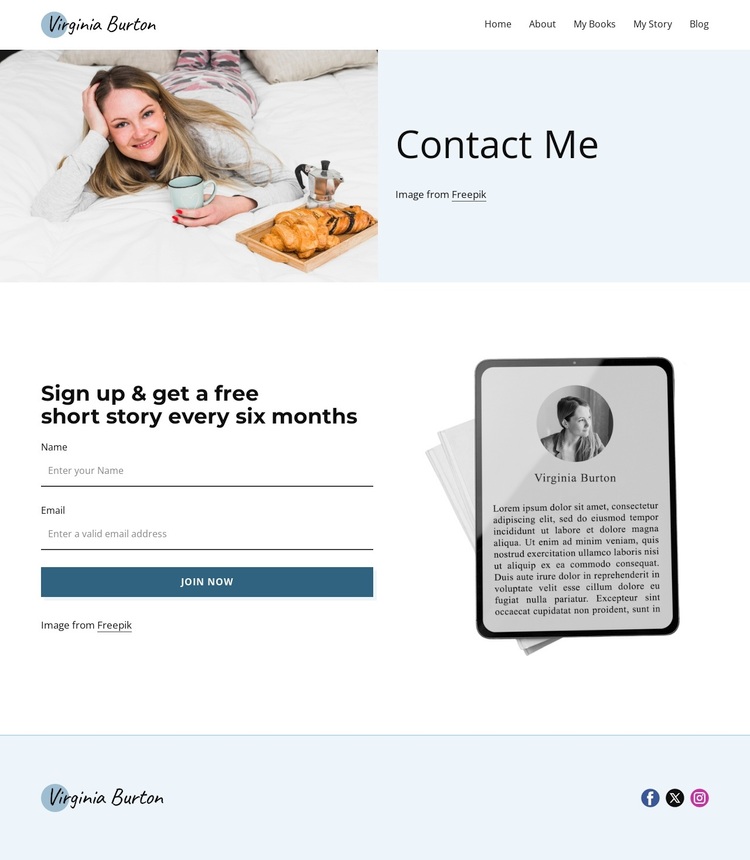
The strongest reason to choose this design is the direct relationship between its editorial identity and its newsletter offer. The navigation names the author’s wider content world through Home, About, My Books, My Story, and Blog, while the split Contact Me opening introduces the person behind that work with a large author image and restrained attribution text. The design therefore establishes context before asking readers to respond, rather than presenting a subscription form without a recognizable subject.
The central promise is specific: readers are invited to sign up and receive a free short story every six months. A name-and-email form and the Join Now button make that offer immediately actionable, while the reading illustration reinforces the connection between the subscription and the author’s written work. The soft pastel blue and white palette, charcoal typography, teal-blue action accent, and generous spacing keep the page closer to an editorial contact experience than to a crowded promotional layout. The footer adds Facebook, Twitter, and Instagram links without competing with the main invitation. This combination makes the template a useful choice for projects that need a personal author introduction, a modest recurring newsletter message, and a simple reader response path in one page. Its appeal comes from the alignment of image, story-related offer, form, and supporting navigation.
Customize with Nicepage
Open this ready-made template in the Template Builder and customize it visually in the Nicepage editor. Replace demo content, edit page sections, and adapt the design to your project without rebuilding the template from scratch.
Start With a Ready-Made Template
Choose a Design for a New Page
Use a ready-made template as a starting point instead of creating every page from a blank canvas. When adding a new page in Nicepage, browse available designs, compare different layouts, and choose an option that already fits the general purpose and visual direction of your project.
Browse Different Page Designs
Explore Page Designs using search, thematic categories, Design Sets, and full-page previews. The collection includes layouts for different subjects and page purposes, making it easier to compare alternatives before selecting a design to customize.
Customize the Selected Template
After choosing a design, create the page and continue editing it visually in Nicepage. Replace the demo content, adjust images, typography, colors, sections, and other elements, and adapt the ready-made layout to your own content instead of rebuilding the design from the beginning.
Explore More Design Directions
If the first option does not match your project closely enough, return to the design collection and compare other templates before committing to a layout. This makes the template library useful not only for faster page creation, but also for exploring different visual approaches and finding a suitable starting point for a new project.
This workflow gives you access to a broad collection of ready-made designs that can be selected, compared, and customized according to the needs of each new page or project.