Spa boutique hotel Template



Edit Template Offline
2. Create new page and search for id 360464
Edit Template Online
Create Awesome Websites


Free Nicepage Builder
Keywords
Rounded Resort Imagery Meets a Detailed Treatment Offer
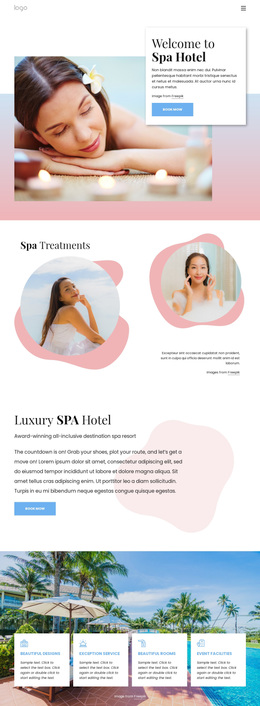
Large spa and resort photographs carry much of the first impression, but the design is not limited to atmospheric imagery. The soft pink, white, and pale blue palette, dark serif headings, light sans-serif body text, rounded organic shapes, layered cards, and generous spacing establish a calm visual direction for a wellness-oriented project. That combination gives the page a clear character before the visitor reaches the detailed service content.
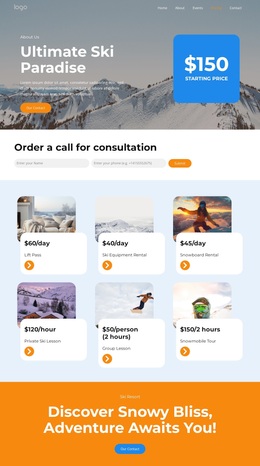
The strongest reason to choose this option is the way it connects hotel context with a specific treatment catalog. Four feature cards introduce hotel-related qualities, while four treatment cards present facial treatment, back massage, Thai stone massage, and Thai foot massage with displayed prices, voucher durations, descriptions, images, and booking buttons. The benefits panel and seven-item list add educational support, so the page can explain why spa treatments matter instead of relying only on service names.
The result is a design suited to projects that need both resort atmosphere and a visible path toward treatment interest. A welcome booking action, additional booking prompts, “view more” content, and the closing contact form give the layout several response points. Sample prices, labels, and placeholder copy should be replaced with verified project information, but the underlying content coverage already distinguishes this design from a generic hotel homepage or an image-only spa presentation.
Customize with Nicepage
Open this ready-made template in the Template Builder and customize it visually in the Nicepage editor. Replace demo content, edit page sections, and adapt the design to your project without rebuilding the template from scratch.
Start With a Ready-Made Template
Choose a Design for a New Page
Use a ready-made template as a starting point instead of creating every page from a blank canvas. When adding a new page in Nicepage, browse available designs, compare different layouts, and choose an option that already fits the general purpose and visual direction of your project.
Browse Different Page Designs
Explore Page Designs using search, thematic categories, Design Sets, and full-page previews. The collection includes layouts for different subjects and page purposes, making it easier to compare alternatives before selecting a design to customize.
Customize the Selected Template
After choosing a design, create the page and continue editing it visually in Nicepage. Replace the demo content, adjust images, typography, colors, sections, and other elements, and adapt the ready-made layout to your own content instead of rebuilding the design from the beginning.
Explore More Design Directions
If the first option does not match your project closely enough, return to the design collection and compare other templates before committing to a layout. This makes the template library useful not only for faster page creation, but also for exploring different visual approaches and finding a suitable starting point for a new project.
This workflow gives you access to a broad collection of ready-made designs that can be selected, compared, and customized according to the needs of each new page or project.