Creative culture in school Template
Edit Template Offline
2. Create new page and search for id 29476
Edit Template Online
Create Awesome Websites


Free Nicepage Builder
Keywords
Four Disciplines Meet a Visual Story of Creative Study
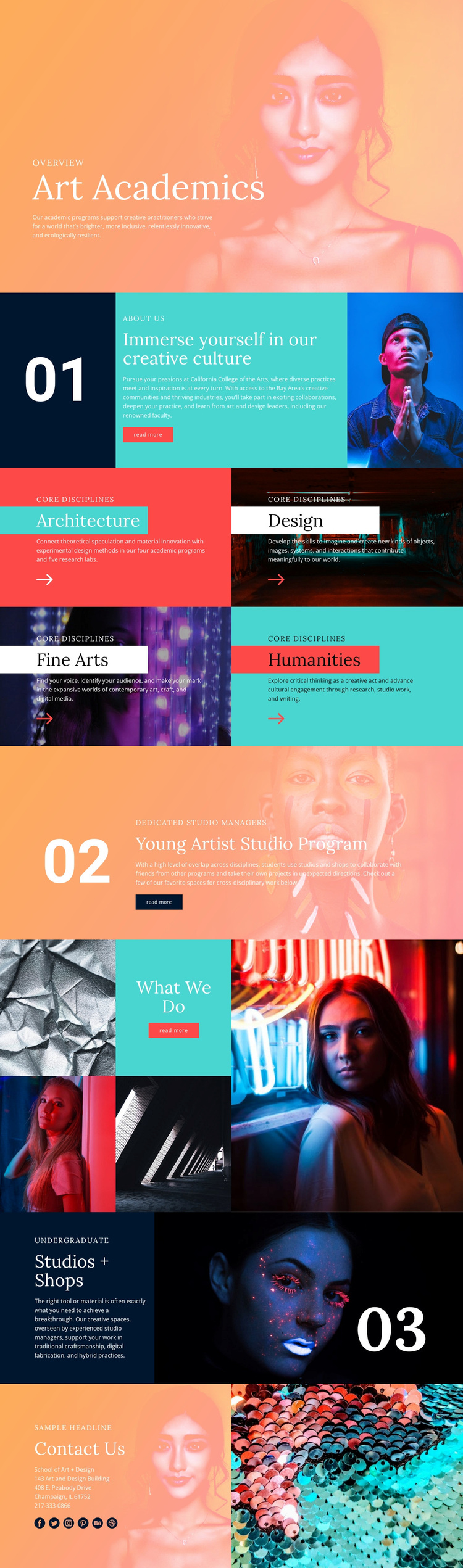
The four-panel Core disciplines section gives this design a particularly clear reason to be considered for an art education project. Architecture, Design, Fine Arts, and Humanities are not hidden inside a long text column; each receives a colored, image-backed panel with its own heading and description. That arrangement communicates breadth while preserving enough separation for visitors to recognize different academic directions.
The surrounding sections make the option more distinctive. Art Academics begins with a portrait-led introduction, and the About Us block combines a numbered marker, institutional copy, action, and image instead of relying on a conventional text-only overview. The Young Artist Studio Program adds a specific creative opportunity, while the What We Do gallery shifts the emphasis from explanation to visual evidence through an asymmetrical mosaic of artwork and portrait images.
Studios + Shops extends the page toward facilities and resources, pairing undergraduate context with a large artwork image. Contact Us then provides a practical closing area with school information, telephone details, and social links. The combination suits projects that need to present academic disciplines, creative activity, and study resources in the same visual narrative. Its strongest distinction is the relationship between structured program coverage and art-directed imagery, rather than a generic claim that it can serve any professional website.
Customize with Nicepage
Open this ready-made template in the Template Builder and customize it visually in the Nicepage editor. Replace demo content, edit page sections, and adapt the design to your project without rebuilding the template from scratch.
Start With a Ready-Made Template
Choose a Design for a New Page
Use a ready-made template as a starting point instead of creating every page from a blank canvas. When adding a new page in Nicepage, browse available designs, compare different layouts, and choose an option that already fits the general purpose and visual direction of your project.
Browse Different Page Designs
Explore Page Designs using search, thematic categories, Design Sets, and full-page previews. The collection includes layouts for different subjects and page purposes, making it easier to compare alternatives before selecting a design to customize.
Customize the Selected Template
After choosing a design, create the page and continue editing it visually in Nicepage. Replace the demo content, adjust images, typography, colors, sections, and other elements, and adapt the ready-made layout to your own content instead of rebuilding the design from the beginning.
Explore More Design Directions
If the first option does not match your project closely enough, return to the design collection and compare other templates before committing to a layout. This makes the template library useful not only for faster page creation, but also for exploring different visual approaches and finding a suitable starting point for a new project.
This workflow gives you access to a broad collection of ready-made designs that can be selected, compared, and customized according to the needs of each new page or project.