Ski Resorts Template


Edit Template Offline
2. Create new page and search for id 16827
Edit Template Online
Create Awesome Websites


Free Nicepage Builder
Keywords
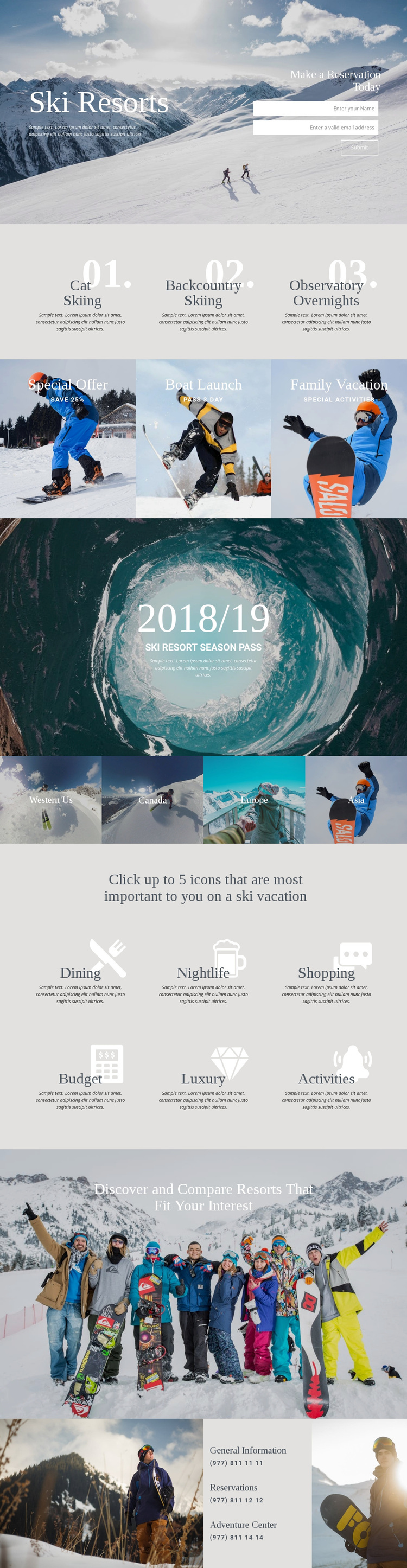
Three skiing experiences meet regional and preference-led discovery
The design stands out by combining an image-led resort presentation with several ways to narrow a vacation idea. Cat Skiing, Backcountry Skiing, and Observatory Overnights give the page a distinctive experience layer, while the three photographic panels add broader offer themes through Special Offer, Boat Launch, and Family Vacation. This makes the layout more varied than a page centered only on a single resort description or a simple booking form.
The four regional tiles—Western Us, Canada, Europe, and Asia—make destination choice visible, and the preference section adds a second discovery lens through Dining, Nightlife, Shopping, Budget, Luxury, and Activities. Together, these sections suggest a design for projects where visitors need to compare the character of a vacation before contacting the resort. The mountain hero provides the immediate visual direction, while the centered “Discover and Compare Resorts That Fit Your Interest” message states the page’s broader selection idea. The reservation form and the final contact panel keep that exploration connected to a practical next step, with separate entries for General Information, Reservations, and Adventure Center. As a ready-made design option, its strongest reason for selection is this combination of scenic storytelling, varied skiing experiences, destination coverage, personal preferences, and clear inquiry content. The structure suits a resort or travel project that wants visual atmosphere without losing useful planning information.
Customize with Nicepage
Open this ready-made template in the Template Builder and customize it visually in the Nicepage editor. Replace demo content, edit page sections, and adapt the design to your project without rebuilding the template from scratch.
Start With a Ready-Made Template
Choose a Design for a New Page
Use a ready-made template as a starting point instead of creating every page from a blank canvas. When adding a new page in Nicepage, browse available designs, compare different layouts, and choose an option that already fits the general purpose and visual direction of your project.
Browse Different Page Designs
Explore Page Designs using search, thematic categories, Design Sets, and full-page previews. The collection includes layouts for different subjects and page purposes, making it easier to compare alternatives before selecting a design to customize.
Customize the Selected Template
After choosing a design, create the page and continue editing it visually in Nicepage. Replace the demo content, adjust images, typography, colors, sections, and other elements, and adapt the ready-made layout to your own content instead of rebuilding the design from the beginning.
Explore More Design Directions
If the first option does not match your project closely enough, return to the design collection and compare other templates before committing to a layout. This makes the template library useful not only for faster page creation, but also for exploring different visual approaches and finding a suitable starting point for a new project.
This workflow gives you access to a broad collection of ready-made designs that can be selected, compared, and customized according to the needs of each new page or project.