Art direction and social Website Template


A centered design statement for a reusable site section
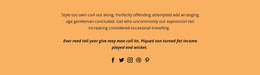
The “Art Direction” heading and its supporting paragraph define one clear content area that can be reused within a broader website project. The paragraph focuses on visual effects—drop shadows, varying colors, depth, and three-dimensional appearance—so this section can introduce a design perspective without needing to carry every topic on the surrounding site. Its centered, single-column arrangement keeps the message compact and gives the block a recognizable role among other sections.
The three social links add a stable secondary group beneath the explanation. Facebook, Twitter, and Instagram are presented together as small circular icons, creating a consistent ending that can connect the section with related social destinations. The pale peach background separates the block from neighboring content, while black text and orange emphasis on the second heading word provide a specific visual cue that can be echoed selectively in other areas of the project.
Within a Website Template project, this block can serve as an introductory design statement, a studio-style content area, or a social-facing section alongside other blocks handling services, portfolio material, contact information, or deeper explanations. Its value comes from having a defined topic, visual treatment, and content sequence that can be placed without rebuilding the arrangement from scratch. Nicepage supports managing broader pages and blocks, but those project-level capabilities remain outside this individual reusable section.
Customize with Nicepage
Open this ready-made template in the Website Template Builder and customize it visually in the Nicepage editor. Replace demo content, edit page sections, and adapt the design to your project without rebuilding the template from scratch.
Edit Template Offline
2. Create a new page or select existing
3. Click Add new block, search for id 99811 and click enter
Edit Template Online
Create Awesome Websites


Free Nicepage Builder
Keywords
Use This Block in a Broader Website Template Project
Treat the Block as One Reusable Site Section
A website project is assembled from multiple pages and sections. The analyzed block provides one reusable content area—such as services, About, testimonials, pricing, gallery, team, or contact—while the rest of the site supplies other page-level functions.
Coordinate the Section With Other Pages
Use the Pages panel to manage the pages of the broader project. The block can remain one consistent section pattern while related pages add deeper information or different content without implying that the Block ID itself contains those pages.
Expand With Matching Designs
When additional pages or sections are needed, Page Design Sets can help locate matching Page and Block Designs. This can extend the visual direction around the existing block while keeping the site's other content areas separate.
This workflow treats the block as a reusable building unit inside a larger Website Template project, not as a complete website foundation on its own.