Unusual recipes Website Template


A Structured Menu Section for a Broader Restaurant Site
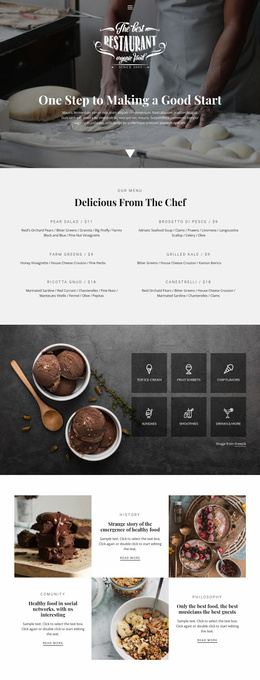
The upper split gives this block a stable role within a larger website project. “Salad recipes” introduces the subject on the left, where the supporting paragraph and “read more” button can direct attention toward fuller recipe or offering information. The food photograph on the right supplies an immediate visual reference, and its orange square outline connects with the orange typography and button treatment. This relationship makes the section recognizable when it appears among other content areas.
Below the introduction, the three-column menu row provides a reusable pattern for structured offerings. Pear Salad, Brodetto di Pesce, and Farm Greens each occupy an equivalent position with a title, price, and ingredient description. The repeated format supports a focused menu area that can be coordinated with other website sections without requiring every dish to use a separate layout. The listed $11 and $9 prices are part of the displayed sample content and can be replaced for the intended project.
Inside a broader Website Template project, this block can serve as one recurring food or menu section while neighboring blocks handle the restaurant story, gallery, booking information, or contact details. Its combination of image-led introduction and aligned menu entries makes it suitable for a page that needs both atmosphere and scannable offering information. The section contributes a defined content area without becoming the site’s complete structure.
Customize with Nicepage
Open this ready-made template in the Website Template Builder and customize it visually in the Nicepage editor. Replace demo content, edit page sections, and adapt the design to your project without rebuilding the template from scratch.
Edit Template Offline
2. Create a new page or select existing
3. Click Add new block, search for id 922671 and click enter
Edit Template Online
Create Awesome Websites


Free Nicepage Builder
Keywords
Use This Block in a Broader Website Template Project
Treat the Block as One Reusable Site Section
A website project is assembled from multiple pages and sections. The analyzed block provides one reusable content area—such as services, About, testimonials, pricing, gallery, team, or contact—while the rest of the site supplies other page-level functions.
Coordinate the Section With Other Pages
Use the Pages panel to manage the pages of the broader project. The block can remain one consistent section pattern while related pages add deeper information or different content without implying that the Block ID itself contains those pages.
Expand With Matching Designs
When additional pages or sections are needed, Page Design Sets can help locate matching Page and Block Designs. This can extend the visual direction around the existing block while keeping the site's other content areas separate.
This workflow treats the block as a reusable building unit inside a larger Website Template project, not as a complete website foundation on its own.