Weekly Class Timetable Website Template


Edit Template Offline
2. Create new page and search for id 6678178
Edit Template Online
Create Awesome Websites


Free Nicepage Builder
Keywords
Class Scheduling and Membership Areas Establish a Broader Site Foundation
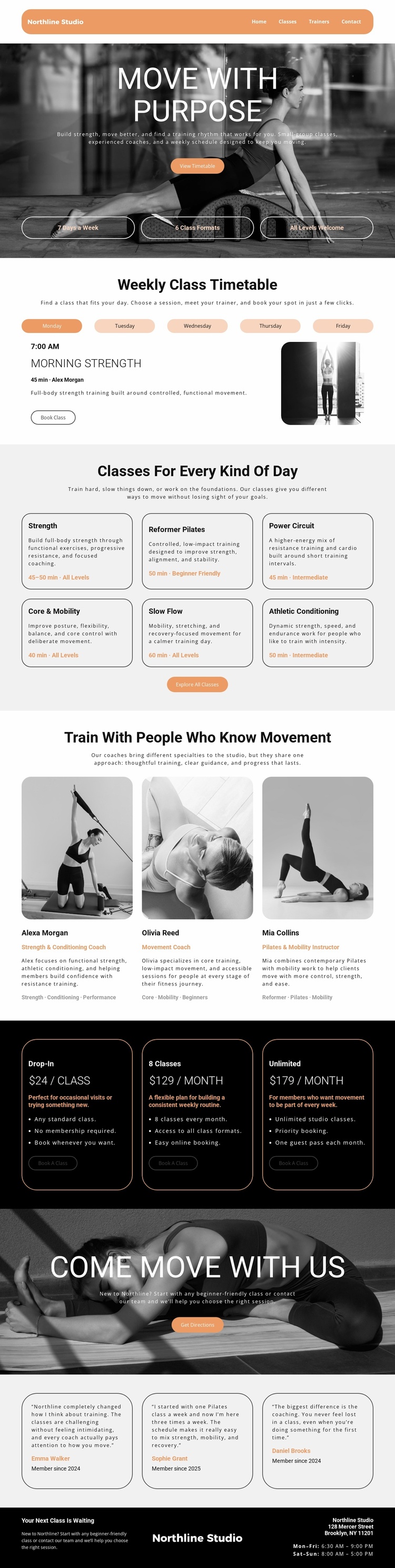
The design already defines several content areas that can anchor a wider Northline Studio project. Navigation identifies Home, Classes, Trainers, and Contact, while the hero establishes the studio’s movement-focused direction. The weekly timetable supplies a practical scheduling area, and the six class-category cards create a clear basis for expanding information about Strength, Reformer Pilates, Power Circuit, Core & Mobility, Slow Flow, and Athletic Conditioning.
The three trainer profiles add a people-focused area that could support fuller biographies or specialist information, while the three membership cards establish a commercial section around Drop-In, 8 Classes, and Unlimited plans. Testimonials provide a proof-oriented content region, and the “Get Directions” prompt, Brooklyn address, and opening hours give the project a concrete contact destination. These are not claims that additional pages already exist; they are verified areas that can inform a broader website structure.
The visual system helps those future areas remain related. Grayscale photography, warm peach accents, bold sans-serif headings, rounded cards, thin borders, and alternating dark and light sections provide recurring design cues that could connect class, trainer, membership, or contact pages. As a website template, the value lies in this combination of content coverage and recognizable direction: the current page supplies a coherent starting architecture, while its categories and recurring components suggest where a larger studio site could expand without losing its central movement-focused character.
Customize with Nicepage
Open this ready-made template in the Website Template Builder and customize it visually in the Nicepage editor. Replace demo content, edit page sections, and adapt the design to your project without rebuilding the template from scratch.
Build a Complete Website From This Template
Customize the Website Visually
Use this ready-made website template as a starting point for your project and adapt its pages visually in Nicepage. Change content, images, typography, navigation, sections, and other design elements while keeping the website together as a single editable project.
Manage Website Pages in One Project
Use the Pages panel to open, add, duplicate, and manage the pages of your website. Work on individual pages while keeping navigation and the overall site structure accessible from the same project, making it easier to develop a complete website instead of managing separate page files.
Expand the Website With Matching Designs
When you need additional pages or sections, use Page Design Sets to find Page and Block Designs created in the same visual style. Design Sets group matching designs together, making it easier to expand the website with new content while maintaining a consistent look across its pages and sections.
Organize Larger Multi-Page Websites
As the website grows, use Page Folders to organize related pages and keep larger multi-page projects easier to navigate in the editor. This is especially useful for websites with separate service pages, company information, contacts, landing pages, and other content areas.
This workflow makes the template a practical foundation for building and expanding a complete website while managing its pages, content, and visual design within one Nicepage project.