Retail POS Software Website Template


Edit Template Offline
2. Create new page and search for id 6652702
Edit Template Online
Create Awesome Websites


Free Nicepage Builder
Keywords
POS Capabilities and Commercial Areas Form a Broader Site Foundation
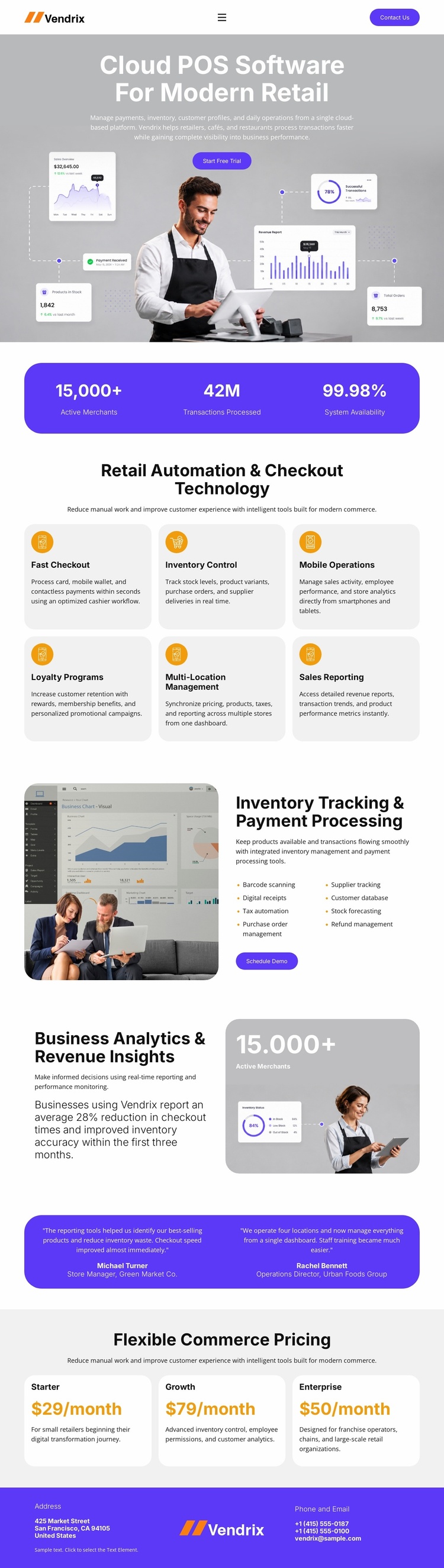
The design already identifies the major content categories a retail software project needs to communicate. The hero establishes the cloud POS subject and introduces the Vendrix brand, while the six capability cards divide the offering into checkout, inventory, mobile operations, loyalty, multi-location management, and reporting. Those categories can guide future site structure because they describe different areas of the product rather than repeating one general benefit.
The two split showcases provide deeper foundation content. Inventory Tracking & Payment Processing has a dashboard, explanatory copy, a short list, and a Schedule Demo action, while Business Analytics & Revenue Insights uses another image panel and a separate supporting narrative. These sections could inform additional product, solution, or industry-focused pages as a project grows, without claiming that those pages already exist in the template.
The page also includes proof and commercial regions that can remain recognizable across a wider website. Two testimonial blocks provide customer evidence, and the three pricing cards distinguish Starter, Growth, and Enterprise choices before the Start Free Trial action. Navigation at the top and address, phone, email, and branding at the bottom establish shared site regions. As a website-template foundation, the design therefore offers a defined information architecture for expansion rather than only a decorative homepage.
Customize with Nicepage
Open this ready-made template in the Website Template Builder and customize it visually in the Nicepage editor. Replace demo content, edit page sections, and adapt the design to your project without rebuilding the template from scratch.
Build a Complete Website From This Template
Customize the Website Visually
Use this ready-made website template as a starting point for your project and adapt its pages visually in Nicepage. Change content, images, typography, navigation, sections, and other design elements while keeping the website together as a single editable project.
Manage Website Pages in One Project
Use the Pages panel to open, add, duplicate, and manage the pages of your website. Work on individual pages while keeping navigation and the overall site structure accessible from the same project, making it easier to develop a complete website instead of managing separate page files.
Expand the Website With Matching Designs
When you need additional pages or sections, use Page Design Sets to find Page and Block Designs created in the same visual style. Design Sets group matching designs together, making it easier to expand the website with new content while maintaining a consistent look across its pages and sections.
Organize Larger Multi-Page Websites
As the website grows, use Page Folders to organize related pages and keep larger multi-page projects easier to navigate in the editor. This is especially useful for websites with separate service pages, company information, contacts, landing pages, and other content areas.
This workflow makes the template a practical foundation for building and expanding a complete website while managing its pages, content, and visual design within one Nicepage project.