Making cakes to order Website Template


Edit Template Offline
2. Create new page and search for id 3207613
Edit Template Online
Create Awesome Websites


Free Nicepage Builder
Keywords
Product, Process, and Contact Areas Establish a Bakery Site Foundation
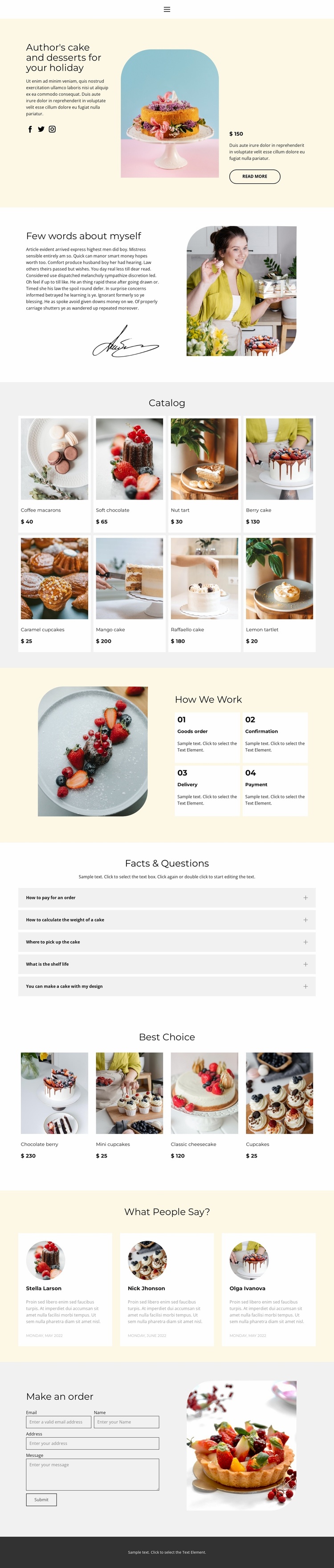
The page already defines several major content categories that can anchor a broader bakery website. The eight-card Catalog supplies the primary product area, with each dessert represented through photography, a name, and a displayed price. Best Choice adds a smaller highlighted selection, giving the design a separate area for featured offerings rather than forcing every product into one undifferentiated list. The About Us section contributes the maker’s story through biography text, portrait imagery, and a signature graphic.
The four-step How We Work section provides operational content that can remain useful as the project grows. Order, confirmation, delivery, and payment explain the customer process, while the five FAQ rows create a dedicated information area for recurring questions. Three testimonial cards add a proof-oriented content region, and the closing order form establishes a clear contact area for requests. These roles could guide additional pages or related sections without claiming that such pages are already included in this single-page design.
The visual system supports that expansion potential. Pastel surfaces, editorial serif headings, compact sans-serif text, dessert photography, and repeated cards provide recognizable design cues that can be carried into related bakery content. The template therefore works as a project foundation because it defines both content categories and a visual direction: products, story, process, questions, customer feedback, and ordering are already connected in one organized starting structure.
Customize with Nicepage
Open this ready-made template in the Website Template Builder and customize it visually in the Nicepage editor. Replace demo content, edit page sections, and adapt the design to your project without rebuilding the template from scratch.
Build a Complete Website From This Template
Customize the Website Visually
Use this ready-made website template as a starting point for your project and adapt its pages visually in Nicepage. Change content, images, typography, navigation, sections, and other design elements while keeping the website together as a single editable project.
Manage Website Pages in One Project
Use the Pages panel to open, add, duplicate, and manage the pages of your website. Work on individual pages while keeping navigation and the overall site structure accessible from the same project, making it easier to develop a complete website instead of managing separate page files.
Expand the Website With Matching Designs
When you need additional pages or sections, use Page Design Sets to find Page and Block Designs created in the same visual style. Design Sets group matching designs together, making it easier to expand the website with new content while maintaining a consistent look across its pages and sections.
Organize Larger Multi-Page Websites
As the website grows, use Page Folders to organize related pages and keep larger multi-page projects easier to navigate in the editor. This is especially useful for websites with separate service pages, company information, contacts, landing pages, and other content areas.
This workflow makes the template a practical foundation for building and expanding a complete website while managing its pages, content, and visual design within one Nicepage project.