Fashionist say Website Template


Edit Template Offline
2. Create new page and search for id 2799161
Edit Template Online
Create Awesome Websites


Free Nicepage Builder
Keywords
Shopping Categories and Product Sections Establish a Site Foundation
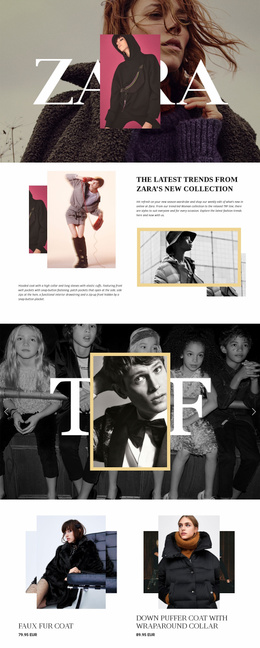
The design already identifies several major content areas that a broader fashion website could build around. Home, About, and Contact links establish the basic site route, while the New Collection hero and Mid Season Sale panel introduce campaign content. The four category cards for Clothes, Shoes, Jewelry, and Accessories then provide a simple information architecture for organizing merchandise interests as the project develops.
The product-focused sections give that foundation more depth. New Arrivals Everyday displays a Shirt jacket, Jeans, and two Women’s top entries beside promotional imagery, and the later Featured Products hero and collage create additional campaign spaces for selected merchandise. These areas could support further product or collection content while preserving the visual relationship between editorial photography, short labels, sale messaging, and browsing actions.
The benefits strip contributes a separate service layer through Free Standard Delivery, Refund Guarantee, 24/7 Support, and Discounts Available. At the end, the 10% first-order signup form creates a reusable promotional contact area rather than merely another product panel. Together, navigation, categories, merchandise, editorial content, benefits, signup, and footer information give a wider website project a defined starting structure. Additional pages could grow from these content categories without claiming that they are already included in this single verified homepage.
Customize with Nicepage
Open this ready-made template in the Website Template Builder and customize it visually in the Nicepage editor. Replace demo content, edit page sections, and adapt the design to your project without rebuilding the template from scratch.
Build a Complete Website From This Template
Customize the Website Visually
Use this ready-made website template as a starting point for your project and adapt its pages visually in Nicepage. Change content, images, typography, navigation, sections, and other design elements while keeping the website together as a single editable project.
Manage Website Pages in One Project
Use the Pages panel to open, add, duplicate, and manage the pages of your website. Work on individual pages while keeping navigation and the overall site structure accessible from the same project, making it easier to develop a complete website instead of managing separate page files.
Expand the Website With Matching Designs
When you need additional pages or sections, use Page Design Sets to find Page and Block Designs created in the same visual style. Design Sets group matching designs together, making it easier to expand the website with new content while maintaining a consistent look across its pages and sections.
Organize Larger Multi-Page Websites
As the website grows, use Page Folders to organize related pages and keep larger multi-page projects easier to navigate in the editor. This is especially useful for websites with separate service pages, company information, contacts, landing pages, and other content areas.
This workflow makes the template a practical foundation for building and expanding a complete website while managing its pages, content, and visual design within one Nicepage project.