G-Steel Website Template


Edit Template Offline
2. Create new page and search for id 19073
Edit Template Online
Create Awesome Websites


Free Nicepage Builder
Keywords
Collection Categories Give a Watch Site Room to Expand
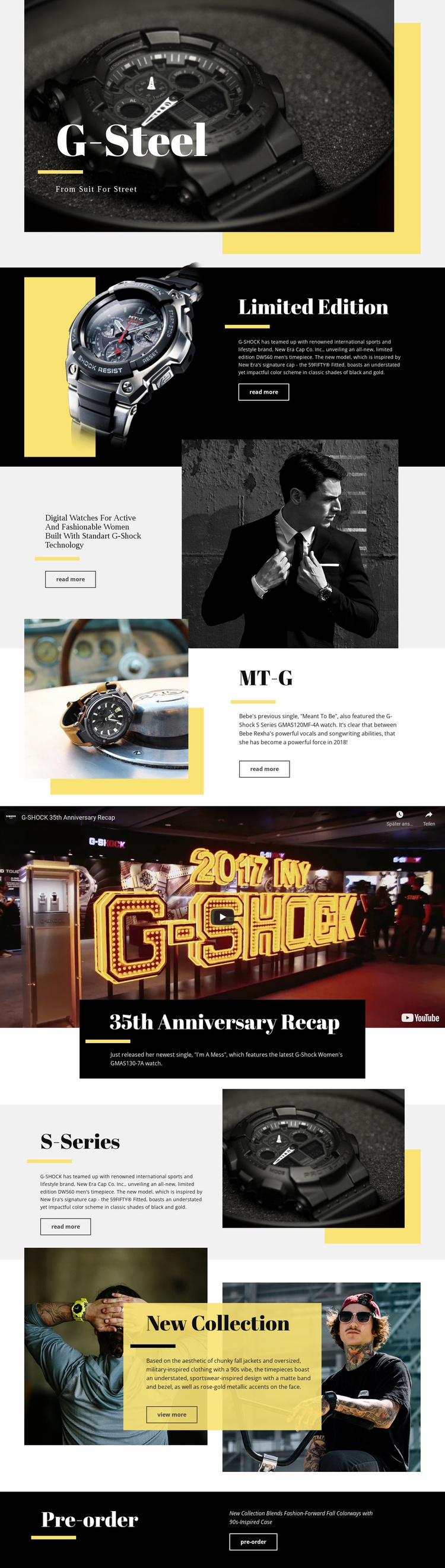
G-Steel already defines several major content areas that can anchor a broader watch website. The hero introduces the collection’s fashion direction, while Limited Edition, MT-G, S-Series, and women’s digital watches provide separate product or category themes. Because each feature uses a related image-and-text arrangement with a Read more link, these areas can act as recognizable starting points for deeper product, collection, or editorial content without losing the visual relationship established on the opening page.
The design also includes brand-story material rather than relying only on product promotion. The full-width anniversary video and the centered 35th Anniversary Recap panel create space for heritage, campaign, or milestone content. This gives a future site more than a catalog-like structure: product groups can sit alongside stories that explain the collection’s context and strengthen its overall identity. The New Collection section adds another useful content category, combining two lifestyle images with a colored text overlay and a View more link.
The closing Pre-order block shows where transactional or campaign-specific content can connect with the wider structure. It provides a direct destination after visitors have encountered several collection themes, while the earlier Read more and View more links support exploration. As a website foundation, G-Steel therefore supplies a clear home-page architecture: a branded introduction, repeatable collection areas, visual storytelling, campaign content, and a final commercial response point. Additional pages can grow from those established categories rather than requiring an unrelated structure.
Customize with Nicepage
Open this ready-made template in the Website Template Builder and customize it visually in the Nicepage editor. Replace demo content, edit page sections, and adapt the design to your project without rebuilding the template from scratch.
Build a Complete Website From This Template
Customize the Website Visually
Use this ready-made website template as a starting point for your project and adapt its pages visually in Nicepage. Change content, images, typography, navigation, sections, and other design elements while keeping the website together as a single editable project.
Manage Website Pages in One Project
Use the Pages panel to open, add, duplicate, and manage the pages of your website. Work on individual pages while keeping navigation and the overall site structure accessible from the same project, making it easier to develop a complete website instead of managing separate page files.
Expand the Website With Matching Designs
When you need additional pages or sections, use Page Design Sets to find Page and Block Designs created in the same visual style. Design Sets group matching designs together, making it easier to expand the website with new content while maintaining a consistent look across its pages and sections.
Organize Larger Multi-Page Websites
As the website grows, use Page Folders to organize related pages and keep larger multi-page projects easier to navigate in the editor. This is especially useful for websites with separate service pages, company information, contacts, landing pages, and other content areas.
This workflow makes the template a practical foundation for building and expanding a complete website while managing its pages, content, and visual design within one Nicepage project.