Leader in technology Website Template


Edit Template Offline
2. Create new page and search for id 17226
Edit Template Online
Create Awesome Websites


Free Nicepage Builder
Keywords
Product, Feature, and Security Areas Establish a Broader Site Foundation
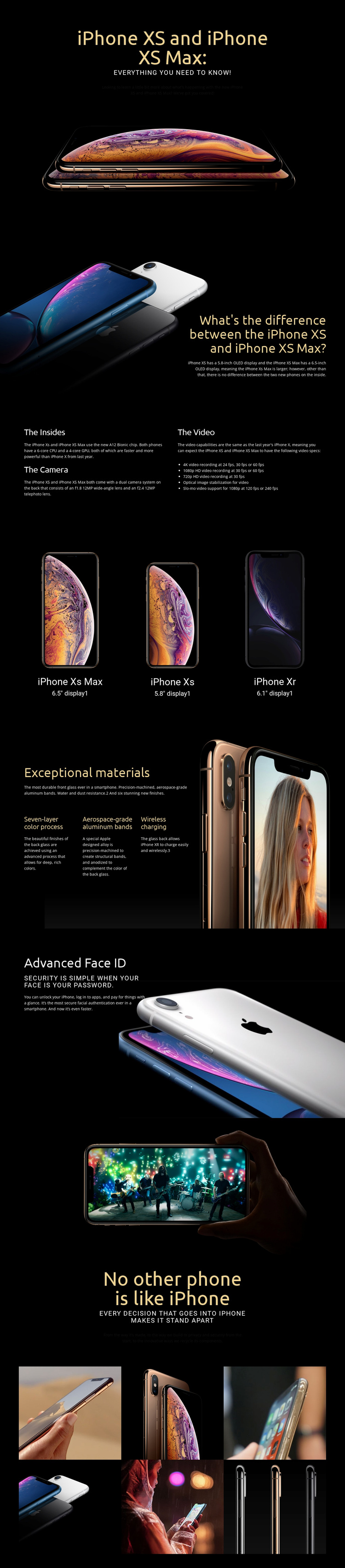
The design already defines several major content categories that could anchor a wider technology website. The opening product introduction establishes the main subject with iPhone XS and iPhone XS Max, while the following comparison section creates a separate area for explaining differences between models. The three-item product display broadens that foundation by placing iPhone XS Max, iPhone XS, and iPhone XR together with their display sizes, giving a future site a clear basis for related product or comparison content.
The feature sections add additional directions for expansion. “The Insides” groups the A12 Bionic chip, dual camera system, and video capabilities, including 4K, 1080p HD, and 720p recording. “Exceptional materials” focuses on the seven-layer color process, aerospace-grade aluminum bands, and wireless charging, while Advanced Face ID provides a separate security and authentication area. These topics could inform additional pages or recurring sections without requiring the existing page to be treated as a complete multi-page website.
The visual system supports that project foundation. Black backgrounds, bright phone imagery, large headings, and generous spacing can connect related product information, while the six-image gallery provides a model for image-led content. The page therefore offers more than a styled homepage with no direction: it identifies product, comparison, technical, construction, security, and visual-content areas that a broader consumer-electronics project could develop. The expansion opportunity comes from the relationships already present, not from an unsupported claim that additional pages are included.
Customize with Nicepage
Open this ready-made template in the Website Template Builder and customize it visually in the Nicepage editor. Replace demo content, edit page sections, and adapt the design to your project without rebuilding the template from scratch.
Build a Complete Website From This Template
Customize the Website Visually
Use this ready-made website template as a starting point for your project and adapt its pages visually in Nicepage. Change content, images, typography, navigation, sections, and other design elements while keeping the website together as a single editable project.
Manage Website Pages in One Project
Use the Pages panel to open, add, duplicate, and manage the pages of your website. Work on individual pages while keeping navigation and the overall site structure accessible from the same project, making it easier to develop a complete website instead of managing separate page files.
Expand the Website With Matching Designs
When you need additional pages or sections, use Page Design Sets to find Page and Block Designs created in the same visual style. Design Sets group matching designs together, making it easier to expand the website with new content while maintaining a consistent look across its pages and sections.
Organize Larger Multi-Page Websites
As the website grows, use Page Folders to organize related pages and keep larger multi-page projects easier to navigate in the editor. This is especially useful for websites with separate service pages, company information, contacts, landing pages, and other content areas.
This workflow makes the template a practical foundation for building and expanding a complete website while managing its pages, content, and visual design within one Nicepage project.