Starbucks Coffee Website Template


Edit Template Offline
2. Create new page and search for id 17223
Edit Template Online
Create Awesome Websites


Free Nicepage Builder
Keywords
Product and Campaign Areas Form a Broader Site Foundation
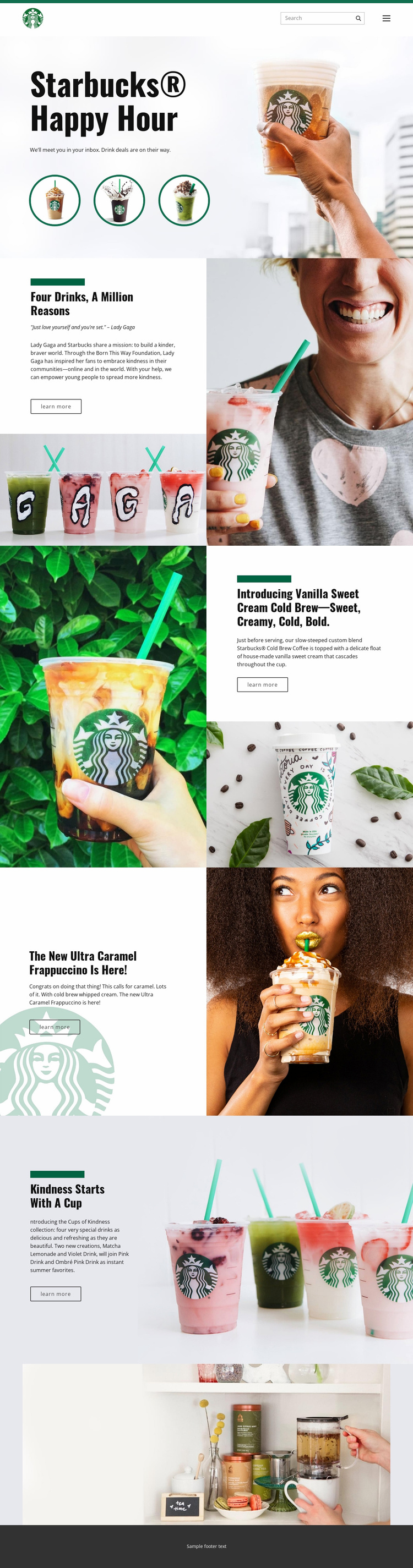
The design already identifies several major content categories that a broader beverage website could build around. The header supplies a shared navigation and search region, while the Happy Hour hero establishes a campaign entry point. The middle of the page then separates a kindness initiative from individual beverage promotions, giving future site content a starting information architecture rather than only a decorative homepage.
The Cups of Kindness section can represent collection or campaign content, with Matcha Lemonade, Violet Drink, Pink Drink, and Ombré Pink Drink grouped under one theme. Vanilla Sweet Cream Cold Brew and Ultra Caramel Frappuccino are treated differently as focused product features, each with descriptive copy and supporting imagery. That distinction can help a larger project organize recurring product information, seasonal campaigns, and editorial features while keeping their visual roles clear.
The existing navigation, split content regions, wide lifestyle image, and dark footer also provide a consistent framework for related pages. A project could extend the direction with additional promotional or informational areas without claiming that those pages already exist in this template. Its value as a website foundation comes from the verified categories and relationships already visible: brand entry, campaign storytelling, featured beverages, collection presentation, visual closure, and shared site framing.
Customize with Nicepage
Open this ready-made template in the Website Template Builder and customize it visually in the Nicepage editor. Replace demo content, edit page sections, and adapt the design to your project without rebuilding the template from scratch.
Build a Complete Website From This Template
Customize the Website Visually
Use this ready-made website template as a starting point for your project and adapt its pages visually in Nicepage. Change content, images, typography, navigation, sections, and other design elements while keeping the website together as a single editable project.
Manage Website Pages in One Project
Use the Pages panel to open, add, duplicate, and manage the pages of your website. Work on individual pages while keeping navigation and the overall site structure accessible from the same project, making it easier to develop a complete website instead of managing separate page files.
Expand the Website With Matching Designs
When you need additional pages or sections, use Page Design Sets to find Page and Block Designs created in the same visual style. Design Sets group matching designs together, making it easier to expand the website with new content while maintaining a consistent look across its pages and sections.
Organize Larger Multi-Page Websites
As the website grows, use Page Folders to organize related pages and keep larger multi-page projects easier to navigate in the editor. This is especially useful for websites with separate service pages, company information, contacts, landing pages, and other content areas.
This workflow makes the template a practical foundation for building and expanding a complete website while managing its pages, content, and visual design within one Nicepage project.