Outstanding quality of music Website Template


Edit Template Offline
2. Create new page and search for id 17189
Edit Template Online
Create Awesome Websites


Free Nicepage Builder
Keywords
Feature, variant, and reference areas provide a product-site foundation
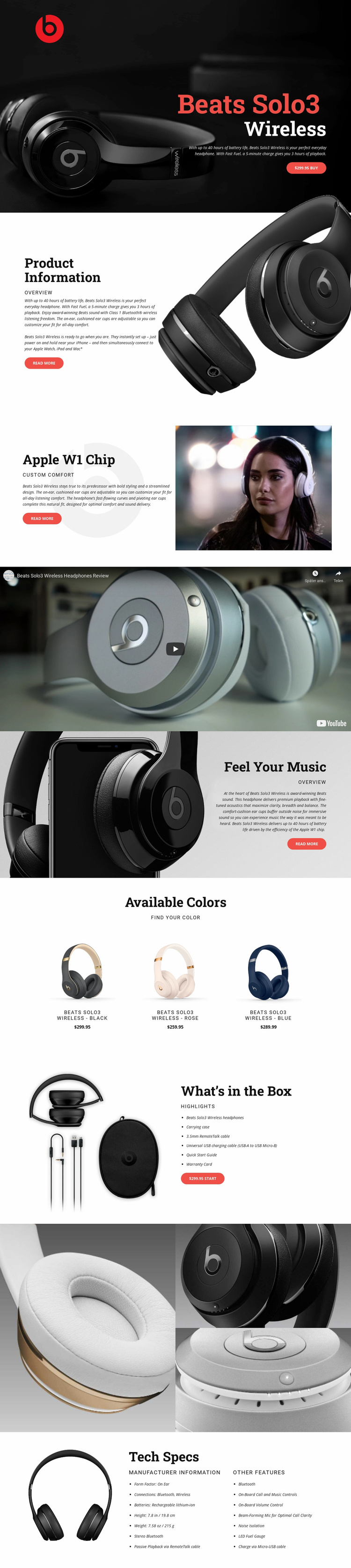
The design already establishes several major content categories that a broader headphone website could build around. The hero and Product Information sections define the central product presentation, while Apple W1 Chip, custom comfort, and Feel Your Music provide separate areas for feature and performance explanations. Because these sections use related split layouts, additional product information could follow the same visual direction without making the homepage feel disconnected from its core subject.
The Available Colors grid introduces a recurring variant pattern with black, rose, and blue headphones, names, and prices. That pattern can serve as a starting structure for related product options or comparison content, while the What’s in the Box section demonstrates how practical ownership information can occupy its own page region. The video and close-up gallery add media categories that could support product demonstrations, campaign content, or detail-focused presentations.
The final Tech Specs block gives the project an important reference layer. Manufacturer information, form factor, Bluetooth and wireless connections, rechargeable battery details, dimensions, weight, and other features are arranged separately from the promotional copy. This distinction helps a larger website extend into product details, support information, or related pages while keeping the visual system coherent. The design does not by itself prove a multi-page site, but its defined content areas provide a clear foundation for expanding a product-focused website. Nicepage’s Pages panel can manage additional pages when the project grows.
Customize with Nicepage
Open this ready-made template in the Website Template Builder and customize it visually in the Nicepage editor. Replace demo content, edit page sections, and adapt the design to your project without rebuilding the template from scratch.
Build a Complete Website From This Template
Customize the Website Visually
Use this ready-made website template as a starting point for your project and adapt its pages visually in Nicepage. Change content, images, typography, navigation, sections, and other design elements while keeping the website together as a single editable project.
Manage Website Pages in One Project
Use the Pages panel to open, add, duplicate, and manage the pages of your website. Work on individual pages while keeping navigation and the overall site structure accessible from the same project, making it easier to develop a complete website instead of managing separate page files.
Expand the Website With Matching Designs
When you need additional pages or sections, use Page Design Sets to find Page and Block Designs created in the same visual style. Design Sets group matching designs together, making it easier to expand the website with new content while maintaining a consistent look across its pages and sections.
Organize Larger Multi-Page Websites
As the website grows, use Page Folders to organize related pages and keep larger multi-page projects easier to navigate in the editor. This is especially useful for websites with separate service pages, company information, contacts, landing pages, and other content areas.
This workflow makes the template a practical foundation for building and expanding a complete website while managing its pages, content, and visual design within one Nicepage project.