Spring shoes collection Website Template


A Split Footwear Introduction for a Broader Site Structure
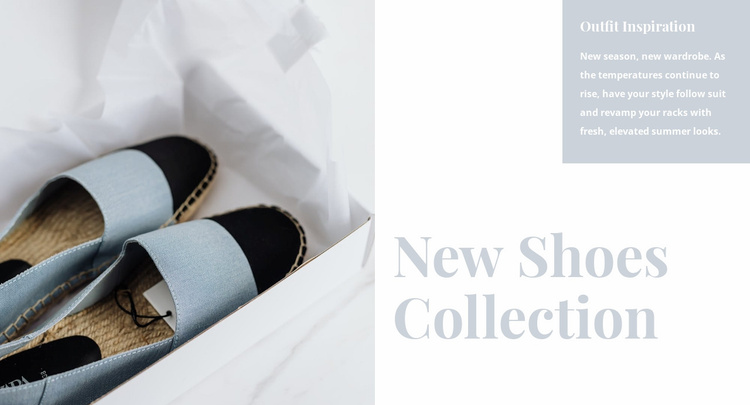
The left image area and right text column already define one stable content role: introducing a footwear collection with a strong seasonal mood. The large light-blue shoe photograph supplies visual evidence for the subject, while the “Outfit Inspiration” heading opens the message and “New Shoes Collection” gives it a clear focal point. The paragraph about rising temperatures and fresh summer looks adds context without competing with the larger lower headline.
As a Website Template section, this block can serve as a reusable collection-introduction pattern inside a broader fashion project. It may sit near the beginning of a page before product displays, category details, editorial content, or other shopping-related sections, while those surrounding areas provide information that this block does not contain. Its value at site level is therefore the repeatable relationship between image, seasonal copy, and promotional hierarchy rather than a claim that the section includes a complete store structure.
The pale blue, gray, white, and black palette also gives the block a visual direction that can be coordinated with related sections. Other blocks could echo its quiet tones or serif headline treatment while using different layouts for product listings, brand information, or contact content. Because the arrangement is static and internally focused on one collection introduction, it remains easy to reuse as a defined site area without inventing navigation, commerce components, or additional page content.
Customize with Nicepage
Open this ready-made template in the Website Template Builder and customize it visually in the Nicepage editor. Replace demo content, edit page sections, and adapt the design to your project without rebuilding the template from scratch.
Edit Template Offline
2. Create a new page or select existing
3. Click Add new block, search for id 160248 and click enter
Edit Template Online
Create Awesome Websites


Free Nicepage Builder
Keywords
Build a Complete Website From This Template
Customize the Website Visually
Use this ready-made website template as a starting point for your project and adapt its pages visually in Nicepage. Change content, images, typography, navigation, sections, and other design elements while keeping the website together as a single editable project.
Manage Website Pages in One Project
Use the Pages panel to open, add, duplicate, and manage the pages of your website. Work on individual pages while keeping navigation and the overall site structure accessible from the same project, making it easier to develop a complete website instead of managing separate page files.
Expand the Website With Matching Designs
When you need additional pages or sections, use Page Design Sets to find Page and Block Designs created in the same visual style. Design Sets group matching designs together, making it easier to expand the website with new content while maintaining a consistent look across its pages and sections.
Organize Larger Multi-Page Websites
As the website grows, use Page Folders to organize related pages and keep larger multi-page projects easier to navigate in the editor. This is especially useful for websites with separate service pages, company information, contacts, landing pages, and other content areas.
This workflow makes the template a practical foundation for building and expanding a complete website while managing its pages, content, and visual design within one Nicepage project.