Modern Television Channel One Page Template


Edit Template Offline
2. Create new page and search for id 6668487
Edit Template Online
Create Awesome Websites


Free Nicepage Builder
Keywords
Eight Content Stops Keep Nova View on One Continuous Page
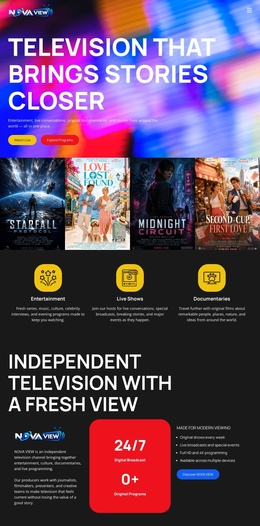
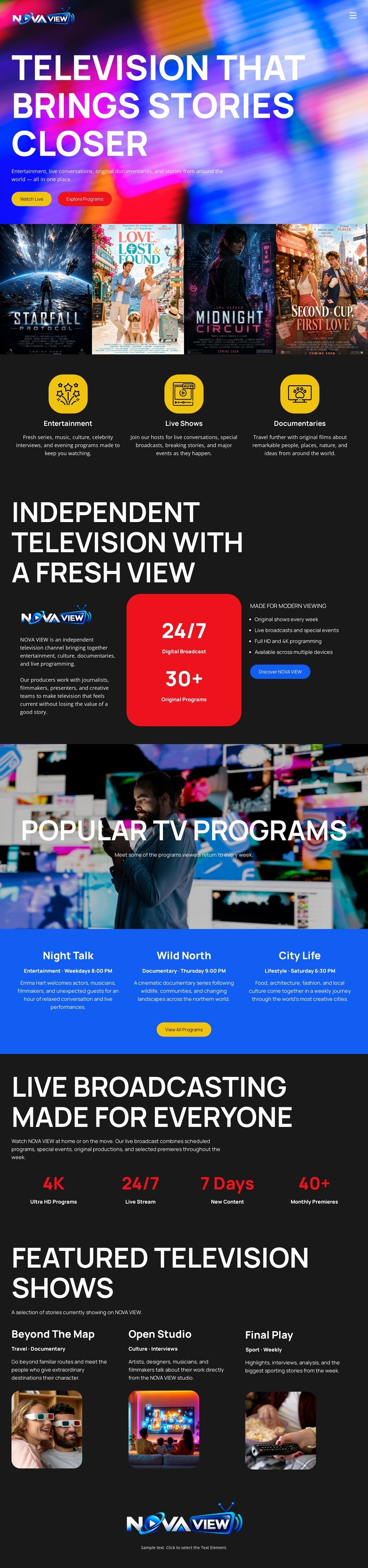
The page’s section order creates several meaningful destinations within one document. The hero introduces Nova View and the broad promise of bringing stories closer. The following poster gallery can serve as a visual programs area, while the three category cards create a separate stop for Entertainment, Live Shows, and Documentaries. The Independent Television With a Fresh View block then shifts to network positioning, giving visitors a reason to understand the channel beyond individual show artwork.
The lower sequence continues that content journey rather than starting a separate page. Popular TV Programs introduces Night Talk, Wild North, and City Life; the broadcasting block explains the live presentation; and Featured Television Shows offers Beyond The Map, Open Studio, and Final Play as another destination for program exploration. Centered Nova View branding closes the document. This arrangement suits a one-page structure because viewers can move through multiple information zones without losing the network context. The sections are distinct enough to support clear navigation labels, yet their progression remains coherent: introduction, program discovery, categories, network identity, popular content, broadcast value, featured shows, and closing brand.
Customize with Nicepage
Open this ready-made template in the One Page Template Builder and customize it visually in the Nicepage editor. Replace demo content, edit page sections, and adapt the design to your project without rebuilding the template from scratch.
Build a Navigable One-Page Website
Connect the Menu to Page Sections
Organize the website as a sequence of sections on a single page and use the Menu For One-Page Site to connect menu items with individual page Blocks. Visitors can jump directly to sections such as About, Services, Testimonials, or Contact without opening separate pages.
Keep the Website on One URL
A one-page template can combine several parts of a small website within one continuous page. Arrange the Header, introduction, services, portfolio, company information, reviews, contact details, and other relevant sections in the order that fits the project while keeping them accessible through the same page navigation.
Make Long Pages Easier to Navigate
For longer one-page websites, keep navigation labels short and connected to meaningful sections so visitors can move through the page without relying only on scrolling. You can also use the Back To Top element to provide a quick way back to the beginning after longer sections.
This workflow makes the template suitable for compact websites that need several distinct content sections while keeping the complete visitor experience on one URL.